

Excavator Control Guide ISO · SAE · backhoe · travel
Excavator Joystick Controls
ISO, SAE & Backhoe Patterns
Boom · stick · bucket · swing · travel
A seat-view guide to excavator joystick directions, the two common control layouts, travel levers, combined movements and the quickest way to confirm the pattern in the cab.
Two joysticks. Four main work functions.
Which joystick controls what on an excavator?
On the common ISO-labelled excavator pattern, the left joystick controls stick in/out and swing left/right. The right joystick controls boom up/down and bucket curl/dump. JCB’s 25Z-1/26C-1 Quick Reference Guide shows that arrangement under its ISO control-pattern diagram. ISO 10968 covers earth-moving machinery operator controls, while SAE J1177 specifically covers the arrangement and direction of motion of hydraulic-excavator primary controls. [1] [2] [3]
In the alternate backhoe pattern commonly labelled “SAE” in training material, boom and stick swap joysticks. Swing remains on the left joystick’s side-to-side axis and bucket remains on the right joystick’s side-to-side axis. Caterpillar describes its backhoe-style setting as reversing the boom and stick functions between the joysticks. [4]
Read the movement, not the nickname
Why ISO and SAE labels can differ between machines
ISO 10968:2020 is the current ISO standard for earth-moving machinery operator controls and was confirmed in 2025. SAE J1177 covers the arrangement and direction of motion of hydraulic-excavator primary controls. [1] [2]
Searches for ISO vs SAE excavator controls usually point to these two joystick layouts, but the names are not applied consistently across every manufacturer and machine family. JCB’s 25Z-1/26C-1 guide labels left stick + slew / right boom + bucket as ISO and the boom-left/stick-right layout as SAE. Caterpillar’s 322C FM page, however, calls the left stick + swing / right boom layout an “SAE pattern”. Caterpillar’s 432 backhoe guidance calls the alternate arrangement “backhoe style controls” and says boom and stick reverse between the joysticks. [3] [7] [4]
Read the cab decal or display and match each joystick direction to the machine response. That removes the ambiguity created by pattern nicknames.
For the wider standards framework behind operator training and machine controls, see NIT’s Global Heavy Equipment Operator Training Standards.

Seat-view reference
Excavator control pattern: ISO vs backhoe at a glance
Read the directions from the seated operator’s position. Forward means pushing the joystick away from you; back means pulling it toward you.
| Joystick movement | ISO / excavator pattern | Backhoe / SAE-labelled pattern |
|---|---|---|
| Left joystick — forward | Stick / arm out | Boom down |
| Left joystick — back | Stick / arm in | Boom up |
| Left joystick — left | Swing left | Swing left |
| Left joystick — right | Swing right | Swing right |
| Right joystick — forward | Boom down | Stick / arm out |
| Right joystick — back | Boom up | Stick / arm in |
| Right joystick — left | Bucket curl / close | Bucket curl / close |
| Right joystick — right | Bucket dump / open | Bucket dump / open |
Side-to-side functions stay in the same place. Swing stays on the left joystick and bucket stays on the right. The change is on the fore-aft axes: boom and stick exchange joysticks.
Pattern 1
ISO excavator controls
Left joystick — stick + swing
Push forward: stick / arm out.
Pull back: stick / arm in.
Move left: swing left.
Move right: swing right.
Right joystick — boom + bucket
Push forward: boom down.
Pull back: boom up.
Move left: bucket curl / close.
Move right: bucket dump / open.
JCB’s 25Z-1/26C-1 Quick Reference Guide shows the same ISO-labelled map: dipper in/out and slew on the left joystick; boom raise/lower and bucket crowd/dump on the right. The same guide also shows an in-cab ISO/SAE pattern switch. [3]
Pattern 2
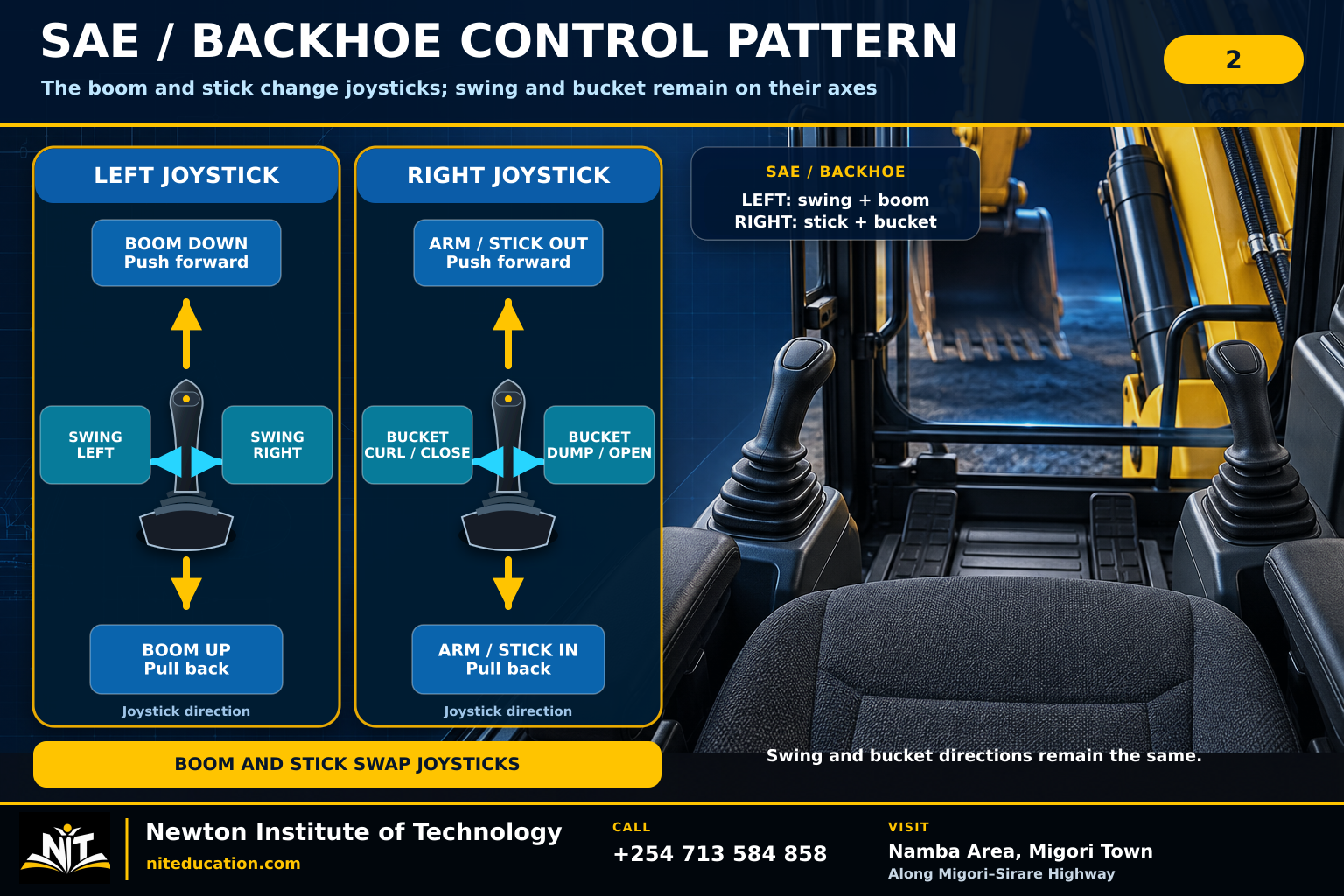
Backhoe control pattern / SAE-labelled excavator controls
In this alternate layout, the boom moves to the left joystick and the stick moves to the right joystick. Swing and bucket keep their side-to-side positions. Caterpillar describes the backhoe-style change as reversing boom and stick functions between the joysticks. [4]
Left joystick
Forward: boom down.
Back: boom up.
Left: swing left.
Right: swing right.
Right joystick
Forward: stick out.
Back: stick in.
Left: bucket curl / close.
Right: bucket dump / open.
What changed?
The fore-aft assignments changed hands. That is the part an operator feels immediately when moving between the two layouts.
Cab familiarisation
How to identify the selected excavator joystick pattern
When you climb into an unfamiliar excavator, the first useful question is not “Which pattern do I normally use?” It is “What pattern is this machine using now?” Read the cab decal, check the selector or display, then try each work function with a light input in a clear area. A simple routine works well: decal → selector/display → function check.
Read the control decal
Match each joystick direction to boom, stick, bucket and swing.
Check the selector or monitor
If the machine has a pattern changer, confirm which position or electronic setting is active.
Set up a clear test area
Use an unloaded attachment and keep the operating zone clear.
Move one axis gently
A small input is enough to identify whether the machine response matches the displayed pattern.
Confirm all four work functions
Check boom, stick, bucket and swing individually before blending movements.
Then use normal coordination
Once the pattern is clear, muscle memory can work for you instead of against you.
Caterpillar’s current joystick guidance lets an operator view the current configuration and preferred lever pattern on applicable machines, while JCB documents an ISO/SAE selector on its 25Z-1/26C-1. NIOSH guidance supports keeping people outside the excavator’s swing radius and away from elevated buckets, attachments and loads while the machine is working. [6] [3] [8]
Where smooth digging begins
A joystick can command two functions at the same time
Each joystick has a fore-aft axis and a side-to-side axis. Move it diagonally and both axes can be active together. Caterpillar documentation for hydraulic excavator controls describes oblique lever movement operating two functions simultaneously. [7]
This is where the diagram stops being enough. During a real digging cycle, the operator is constantly trimming two movements against each other—raising a little while curling, drawing the stick in while controlling bucket angle, or beginning the swing without letting the load wander. Smooth work comes from timing and small corrections, not from moving one lever to the end of its travel and fixing the result afterward.
Control feel
Why small joystick movements matter
ISO 10968 defines a proportional control as one that allows a continuously variable or modulated machine response. Caterpillar lets operators choose slow, medium or fast spool response on applicable Next Gen excavators, illustrating how machine response can be tuned around the operator input. [1] [6]
From the seat, useful control happens mostly between neutral and full stroke. A small input lets you watch the attachment start moving and correct early. Add more lever as the path becomes clear, then ease it back as you approach the position you want. That middle range of joystick travel is where trench lines become cleaner, truck loading becomes calmer and the machine stops feeling rushed.
Separate from the work joysticks
How excavator travel controls, levers and pedals work
On a conventional tracked excavator, the left travel control commands the left track and the right control commands the right track. Depending on the machine, the operator may use hand levers, pedals or a combined lever/pedal arrangement. JCB’s 25Z-1/26C-1 guide shows separate hand and foot track controls and labels track forward and backward alongside the excavator controls. [3]
| Travel input | Typical track response | What the operator sees |
|---|---|---|
| Both controls same direction | Both tracks propel together | The machine travels broadly straight if traction is similar. |
| One control moved more | Tracks move at different rates | The machine arcs toward the slower side. |
| Only one track driven | One side moves while the other acts as the slower side | The machine turns more tightly. |
| Tracks commanded opposite ways | Counter-rotation can occur where the machine and surface permit | The upper structure can remain facing a different direction from travel. |
The orientation matters because the upper structure rotates independently of the undercarriage. Caterpillar notes that when an excavator cab is facing backward, joystick-steering and travel-speed pedal response is reversed relative to the operator’s forward-facing expectation. [9] NIT’s Excavator Parts and Functions guide covers the undercarriage and rotating upper structure in more detail.
From hand movement to hydraulic movement
What happens after you move the joystick?
The joystick is the operator’s command device. On a hydraulic-pilot machine, that command is carried through pilot controls; on electronically controlled excavators, the joystick can send a sensor input that the machine’s control system interprets. Takeuchi’s current TB216 page lists intuitive pilot controls and a pattern-change valve, while Caterpillar’s current excavator guidance shows electronic configuration of joystick functions and preferred lever patterns through the monitor on applicable machines. [5] [6]
For the pumps, valves, cylinders, swing motors and final drives behind that response, continue with NIT’s Heavy Equipment Systems and Components Explained.
Selector valve or electronic setting
Can an excavator switch between ISO and backhoe controls?
Many excavators can. The method depends on the model. JCB shows an ISO/SAE control-pattern switch, Takeuchi lists a pattern-change valve on its current TB216, and Caterpillar documents monitor-based preferred lever-pattern settings on applicable Next Gen excavators. [3] [5] [6]
After a pattern change
Bring the machine, display and operator back into agreement.
- Confirm the selected setting or selector position.
- Check that the cab indication matches the selected layout.
- Run the four work functions one at a time with small inputs.
- Resume coordinated operation once the response is familiar.
From diagram to machine control
A practical sequence for learning excavator joystick controls
Most beginners want to make a complete digging cycle almost immediately. It is usually quicker to learn the machine in smaller pieces. First make each axis predictable; then combine two functions; only then build the full cycle. The diagram teaches direction. Repetition teaches timing.
1. Name the response
Before touching the controls, say what each axis should do in the selected pattern.
2. Isolate each axis
Move boom, stick, bucket and swing separately until start, direction and stop feel deliberate.
3. Combine two functions
Use diagonal inputs to blend the two axes on one joystick without losing control of either function.
4. Build the work cycle
Coordinate boom, stick and bucket, then add swing and travel as the task requires.
For supervised seat time, course details and admissions, see Excavator Operator Training in Kenya. For the wider sequence of plant-operator learning, see the Plant Operator Course Syllabus in Kenya.
Four habits instructors correct early
Common excavator joystick mistakes
Reading the brand, not the pattern
Two machines from familiar brands can be configured differently. Read the actual function map in the cab.
Using full stroke too soon
Large inputs make the learner chase the machine. Smaller inputs leave room to correct before the attachment overshoots.
Combining before isolating
Diagonal inputs are useful only after each axis is understood on its own.
Using the boom as a travel compass
The upper structure rotates. Travel direction comes from undercarriage orientation, not from where the attachment is pointing.
Keep the control lesson connected to the work area
Joystick accuracy matters because the boom, bucket and upper structure move through a large working envelope.
- Keep ground workers outside the swing and attachment operating zone.
- Use the fitted control lock or hydraulic lock as designed when entering, leaving or securing the cab.
- Use agreed site communication when people and machines are working near one another.
- Keep the bucket or attachment response predictable before moving into a live task.
NIOSH guidance specifically calls for keeping workers away from elevated excavator attachments and outside the swing radius. [8]
Same machine, different vocabulary
Boom, arm, stick, dipper, swing and slew
| Term | Meaning in this guide |
|---|---|
| Boom | Main front member hinged to the upper structure; boom up/down changes the height of the working equipment. |
| Arm / stick / dipper | Member between boom and bucket; in/out changes reach and draws the bucket toward or away from the machine. |
| Bucket curl / close / load | Rotates the bucket inward to gather or hold material. |
| Bucket dump / open | Rotates the bucket outward to release material. |
| Swing / slew | Rotates the upper structure left or right over the undercarriage. |
| Travel / propel | Moves or steers the whole excavator through the left and right tracks. |
Quick revision
Excavator joystick controls FAQs
What is the ISO control pattern on an excavator?
The left joystick controls stick in/out and swing left/right. The right joystick controls boom up/down and bucket curl/dump. This is the excavator layout shown in the ISO diagram on this page.
What is the SAE or backhoe pattern?
In the common training use of that name, the left joystick controls boom up/down and swing, while the right joystick controls stick in/out and bucket movement. On the machine itself, identify the pattern by the function map shown on the decal or display rather than by a nickname alone.
What changes between ISO and backhoe controls?
Boom and stick exchange the fore-aft axes between the two joysticks. Swing stays on the left side-to-side axis and bucket stays on the right side-to-side axis.
Can an excavator use both control patterns?
Many models have a pattern-change valve or an electronic lever-pattern setting. The available method depends on the machine specification.
Why do excavator controls feel reversed after the cab turns around?
The upper structure can rotate over the tracks. When the cab is facing the opposite direction over the undercarriage, the operator’s visual sense of forward can be opposite the track orientation.
Can one joystick control two movements at once?
Yes. A diagonal or oblique joystick movement can command both axes at the same time, allowing an operator to blend functions such as stick with swing or boom with bucket.
How should a beginner memorise excavator joystick controls?
Use one cue: sideways stays, fore-aft swaps. Learn each axis separately first; once every response is predictable, begin blending two movements. The diagram fixes the map in your head and practical training builds the timing.
Do joystick buttons and thumb rollers do the same thing on every excavator?
No. Auxiliary buttons, rollers and switches can be assigned to different attachments or machine functions, and some modern excavators allow those functions to be configured electronically. [6]
The control pattern in one sentence
Common ISO-labelled map: left hand = stick + swing; right hand = boom + bucket. Backhoe/SAE-labelled alternate: left hand = boom + swing; right hand = stick + bucket.
If you remember one thing beyond that map, remember the cab itself: read the displayed pattern and the function arrows on the machine in front of you. Once the directions are clear, skill comes from small inputs, clean stops and smooth combinations through the work cycle.
For hands-on training, see Excavator Operator Training in Kenya. For the components behind the controls, continue with Excavator Parts and Functions.
From joystick theory to real machine control
Register for Plant Operator Training at Newton Institute of Technology
This guide gives you the control map. At NIT, practical Plant Operator training develops the next layer of skill: joystick control, boom–stick–bucket coordination, swing, travel, machine familiarisation and complete work cycles under supervision. Learners can include excavator training among the machines selected for their course package. [10]
ProgrammePlant Operator Course
Duration2 months
Training modelApprox. 70% practical · 30% theory
Excavator focusControls · coordination · travel · work cycles
CampusNamba Area, Migori Town
Call / WhatsApp+254 713 584 858
Technical references
Sources
- ISO 10968:2020 — Earth-moving machinery — Operator’s controls. ISO lists the 2020 edition as current after confirmation in 2025.
- SAE J1177_201906 — Hydraulic Excavator Operator Controls. SAE states that the standard covers mobile hydraulic excavator primary-control arrangement and direction of motion.
- JCB 25Z-1 / 26C-1 Quick Reference Guide — Basic Controls. Shows the ISO and SAE joystick diagrams, track-forward/track-back controls and the ISO/SAE pattern selector.
- Caterpillar — 432 Backhoe Loader with Seat-Mounted Controls. Describes changing between excavator pattern and backhoe-style controls, with the boom and stick functions reversing between joysticks.
- Takeuchi TB216 Compact Excavator. The current product page lists intuitive pilot controls and a pattern-change valve.
- Caterpillar — Excavator Joystick Controls. Documents configurable joystick functions and preferred lever-pattern settings on applicable machines.
- Caterpillar 322C FM — Implement Controls. Notes that oblique movement of a joystick can operate two functions simultaneously.
- NIOSH — Preventing Struck-by Fatalities Related to Excavator Quick Couplers, Buckets, and Attachments. Supports exclusion from the swing radius and from beneath elevated excavator attachments or loads.
- Caterpillar — How to Use Joystick Steering on Your Excavator. Explains the change in travel/steering response when the cab faces backward over the undercarriage.
- Newton Institute of Technology — Plant Operator Course Duration in Kenya. Current NIT course structure: 2 months, approximately 70% practical and 30% theory, with multi-machine training packages.
Prepared by: Newton Institute of Technology Editorial Team
Institutional / Technical review: Engineer Simon Barongo
Updated: 26 September 2026 · Editorial scope: joystick patterns, travel controls and operator control response.