

Dashboard Warning Guide symbol · urgency · operator action
Excavator Dashboard Warning Lights and Symbols
Meanings & What Operators Should Do
See it → read it → secure the machine → respond
A practical excavator-operator guide to dashboard warnings: identify the system, understand the message, judge urgency and take the right first action when a light, buzzer or fault code appears.
Read the whole monitor, not the icon alone.
What should you do when an excavator warning light comes on?
Bring the excavator under control, stop loading it and lower the attachment to a stable position. Then read the whole monitor: symbol, gauge, message, buzzer and fault code. Record what appears and carry out the response required for that machine.
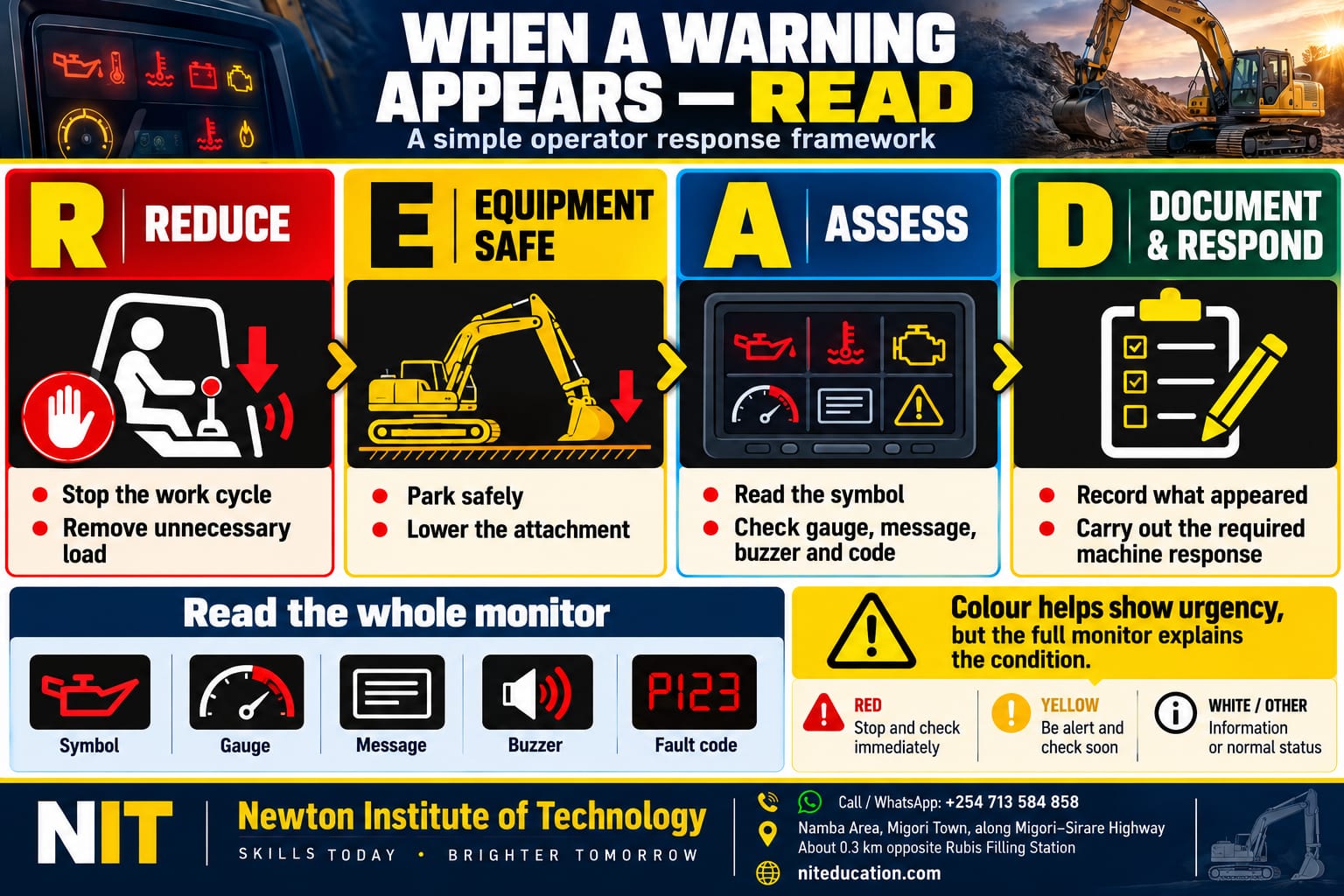
A useful memory sequence is READ — Reduce · Equipment safe · Assess · Document & respond.
Start with the display
Four things an excavator monitor can show you
An excavator monitor combines several kinds of information. The operator needs to separate an actual warning from a gauge, status indicator or selected operating mode.
Warning
A monitored condition needs attention or action. Low engine-oil pressure is a typical example.
Gauge
Shows the current condition or level, such as engine coolant temperature or fuel level.
Status indicator
Confirms that a function is active, such as auto-idle or engine preheat.
Mode symbol
Shows a selected operating mode, such as low travel speed or a particular work mode.
A turtle travel symbol can be normal operating information. An engine-oil-pressure warning reports an abnormal condition. Komatsu documents work mode, travel mode, auto-deceleration, preheat, coolant-temperature information and KDPF information on the same excavator monitor. [6]
Common visual language
Why excavator warning symbols often look familiar
Many earth-moving-machine symbols are internationally standardised. ISO 6405-1:2017 covers common symbols used on operator controls and displays, while ISO 6405-2:2017 covers symbols for specific earth-moving machines, equipment and accessories. Both standards were reviewed and confirmed in 2022. [1] [2]
Manufacturers use different monitor layouts, warning priorities and message systems, while many underlying graphical symbols remain familiar. Read the icon together with the accompanying message, gauge and alarm.
Fast reference
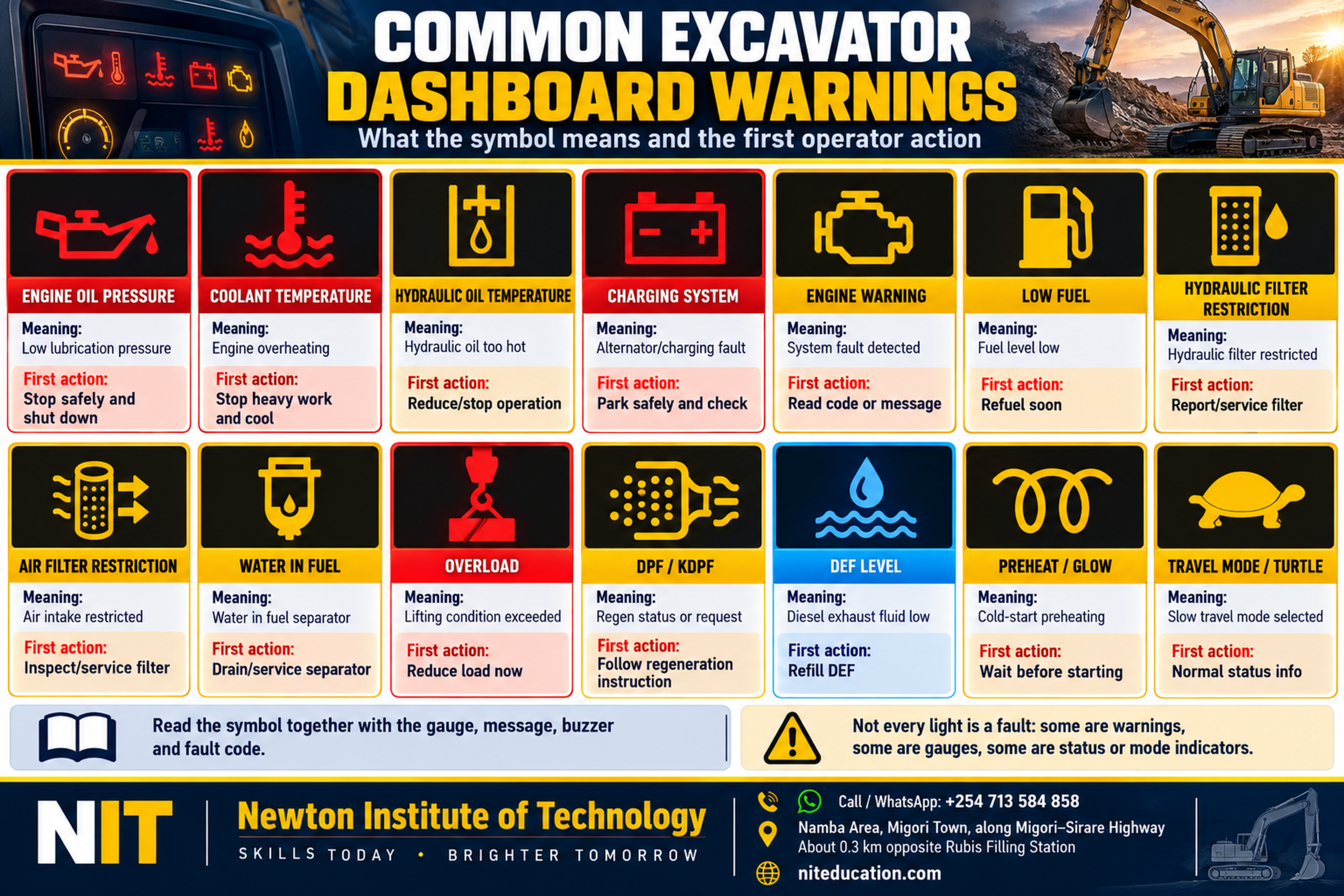
Common excavator dashboard warning lights, meanings and first actions
| Warning / indicator | What it means | First operator response |
|---|---|---|
| Engine oil pressure | Lubrication pressure has fallen below the required operating condition. | Secure the excavator and follow the shutdown instruction. |
| Engine coolant temperature | Engine temperature has become excessive. | Stop loading the engine and follow the machine’s overheating response. |
| Hydraulic oil temperature | Hydraulic oil has reached the monitored high-temperature condition. | Stop heavy operation and respond to the displayed warning. |
| Alternator / charging | The charging system has detected an abnormal condition. | Secure the machine and have the charging system checked. |
| Engine warning | The engine controller has detected a fault or event. | Read and record the accompanying message or code. |
| Low fuel | Fuel has reached the warning range. | Refuel before fuel starvation. |
| Hydraulic-filter restriction | The monitored hydraulic filter is excessively restricted. | Record and report the condition for servicing. |
| Air-filter restriction | Engine intake airflow is restricted. | Service the intake-filter system as specified. |
| Water in fuel | Water is present in the monitored separator/fuel system. | Follow the fuel-separator service procedure. |
| Overload | The monitored lifting condition has reached its warning state. | Stop increasing the load and correct the operating condition. |
| DPF / KDPF | Aftertreatment regeneration is active, inhibited or requesting action. | Read the regeneration message and follow the displayed process. |
| DEF level | Diesel exhaust fluid is approaching or at a refill condition. | Refill with the specified DEF. |
| Preheat / glow | Cold-start preheating is operating. | Allow the prescribed starting sequence to complete. |
| Turtle / travel mode | Slow travel mode is selected. | Normal operating information. |
Hitachi’s ZX75US-7 provides a useful real-machine example: its documented monitor alarms include overheat, engine warning, engine-oil pressure, alternator, minimum fuel, hydraulic-filter restriction, air-filter restriction and overload, while other monitor displays cover normal machine information. [3]
Lubrication warning
Engine oil-pressure warning: secure the machine quickly
The engine-oil-pressure warning reports a lubrication-pressure condition; it is separate from a scheduled oil-change reminder. Caterpillar’s Cat 340D L monitor identifies low engine-oil pressure as a critical condition that activates the Master Caution Lamp. [4]
John Deere operator guidance gives the same condition a direct response: if the low engine-oil-pressure lamp illuminates while the engine is running, stop the engine immediately. [5]
Bring the excavator to a safe position, lower the attachment and follow the shutdown procedure. Check only the operator-level items specified for the machine before it returns to work.
Engine heat warning
Engine coolant-temperature warning: stop loading the engine
High engine coolant temperature is another critical condition on the Cat 340D L monitor system. [4] When the warning appears, stop the work cycle, secure the excavator and follow the cooling or shutdown response shown for that machine.
For radiator airflow, coolant circulation, cooling-pack condition and overheating causes, continue to NIT’s Excavator Cooling System guide. [8]
Hydraulic heat warning
Hydraulic oil-temperature warning: stop heavy operation
Digging, lifting, swinging, travelling and running attachments all generate hydraulic heat. High hydraulic-oil temperature is one of the critical conditions identified by Caterpillar’s Cat 340D L monitor. [4]
John Deere’s operator guidance provides a practical response example: excessive hydraulic temperature calls for stopping, allowing the oil to cool and checking items such as oil level and cooler condition. [5]
For pump flow, main control valves, cylinders, motors and hydraulic-system behaviour, use NIT’s Excavator Main Hydraulic System guide. [9]
Electrical warning
Battery or alternator symbol: read it as a charging-system warning
The battery-shaped or alternator warning relates to the charging system. The fault may involve the alternator, battery, wiring, drive arrangement or another part of the charging circuit. Hitachi includes an alternator alarm among the ZX75US-7 monitored conditions. [3]
If the warning remains active while the engine is running, record it and have the charging system checked.
Air, oil and fuel
Air-filter, hydraulic-filter, water-in-fuel and low-fuel warnings
Air-filter restriction
Intake airflow has reached the monitored restriction condition. Hitachi lists air-filter restriction among ZX75US-7 monitor alarms. [3] Service the intake system according to the machine procedure.
Hydraulic-filter restriction
The monitored hydraulic filter is becoming excessively restricted. Record and report the warning so the filter and oil condition can be checked. [3]
Water in fuel
Water has collected in the monitored separator or fuel system. John Deere gives a stop-and-check response example for a water-in-fuel alert. [5]
Low fuel
The fuel level has reached the warning range. Hitachi includes minimum fuel among the ZX75US-7 monitor alarms. [3] Refuel before the tank reaches fuel starvation.
Lifting condition
Overload warning: stop increasing the load
Hitachi lists overload among the ZX75US-7 monitor alarms and audible-warning conditions. [3] When the warning activates, stop increasing the load and bring the excavator back within the permitted lifting condition.
The allowable lift depends on machine configuration, boom and arm position, working radius, attachment and the manufacturer’s lifting information.
Modern emissions systems
DPF / KDPF regeneration and DEF warnings
Emissions-equipped excavators may display particulate-filter and diesel-exhaust-fluid information. Komatsu documents KDPF regeneration and regeneration-disable information on the PC45MR-5/PC55MR-5 monitor. [6]
On the PC238USLC-11, DEF level is continuously displayed and the monitor gives refill guidance as the level falls. [7] Read the accompanying message and follow the machine’s displayed aftertreatment process.
Normal information
Turtle, travel mode, auto-idle and preheat are not all faults
Travel mode, auto-idle and preheat are operating indicators. Oil-pressure, excessive-temperature and system-fault warnings report abnormal conditions. Komatsu’s monitor layout demonstrates how both types of information can appear together. [6]
Read more than colour
Do not judge an excavator warning by colour alone
Colour helps show urgency, but the complete monitor carries the useful information. Read the symbol · gauge · message · buzzer · fault code together.
The Cat 340D L monitor illustrates the point: its Master Caution Lamp works together with separate gauge, event-display and information areas rather than relying on one coloured lamp to explain the condition. [4]
A four-step response
When a warning appears, use READ
Reduce
Stop loading the excavator and bring the work cycle under control.
Equipment safe
Park safely and lower the attachment to a stable position.
Assess
Read the symbol, gauge, message, buzzer and fault code together.
Document & respond
Record what appeared and carry out the response required for the machine.
It keeps the machine under control first, then turns the dashboard warning into useful information for the operator and maintenance team.
Give maintenance useful evidence
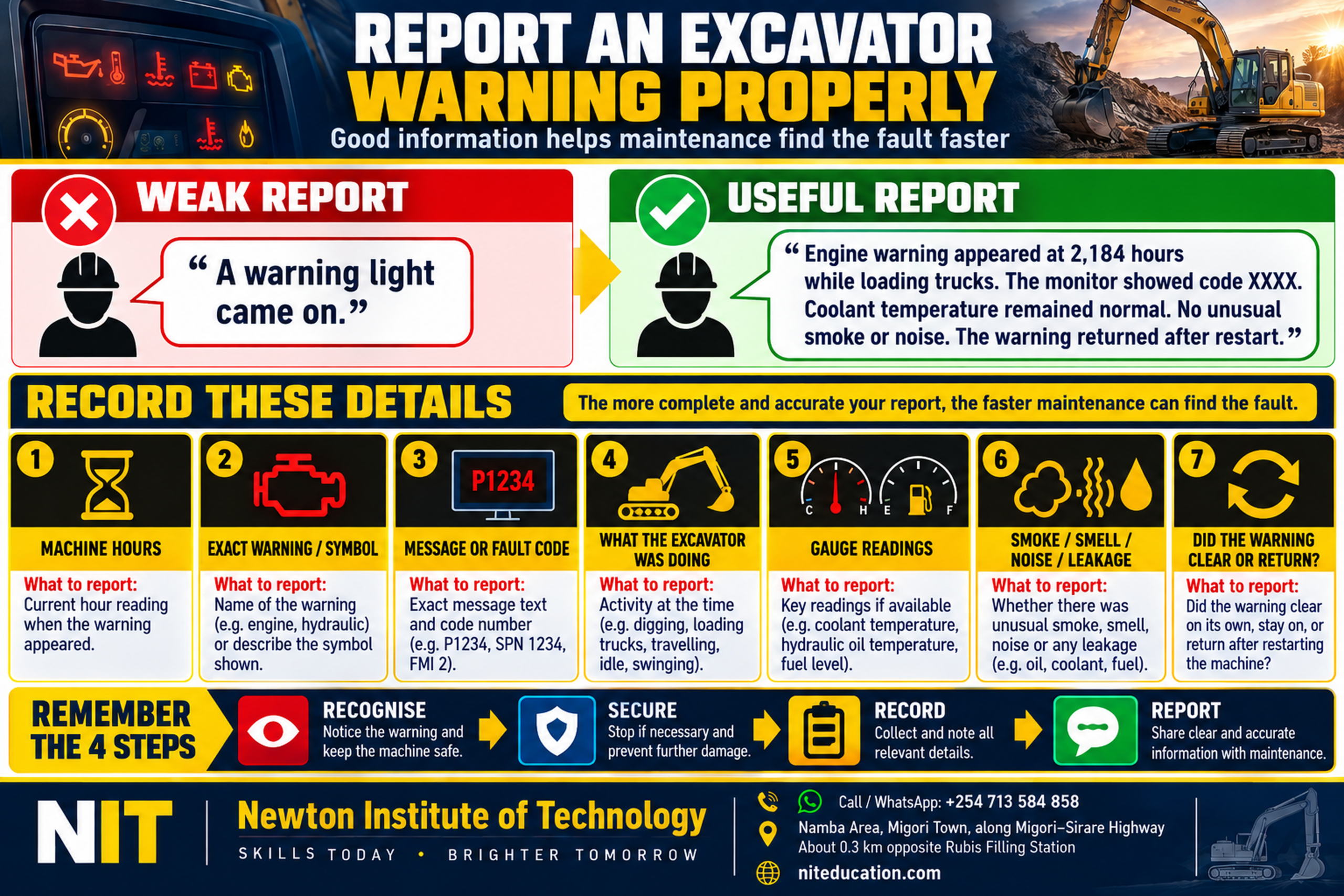
How to report an excavator dashboard warning properly
Good defect reporting starts with what the machine actually showed.
| Weak report | Useful report |
|---|---|
| “A warning light came on.” | “Engine warning appeared at 2,184 hours while loading trucks. The monitor showed code XXXX. Coolant temperature remained normal. No unusual smoke or noise. The warning returned after restart.” |
Machine hours
Record the hour-meter reading when the warning appeared.
Exact warning
Name the warning or describe the symbol accurately.
Message / code
Write the exact message or diagnostic code shown.
Operating condition
State whether the machine was digging, loading, travelling, lifting or idling.
Gauge readings
Note coolant temperature, hydraulic temperature, fuel or other useful indications.
Other symptoms
Record unusual smoke, smell, noise, leakage or loss of performance.
Did it return?
State whether the warning cleared, stayed active or returned after restart.
Before the work cycle
Dashboard checks during excavator start-up
Watch the monitor as the machine completes its start-up sequence. Confirm that normal operating information appears correctly and investigate warnings that remain active.
For the complete pre-start routine—from the work area and walk-around to fluids, cab controls and start-up checks—use NIT’s Plant Operator Pre-Start Inspection Checklist. [10]
Read the machine, not only the controls
How dashboard knowledge fits into excavator training
Learning excavator operation is not only about making the boom, arm, bucket and upper structure move. A competent operator also learns to recognise normal gauges, distinguish operating indicators from faults, notice temperature behaviour, read messages and codes, and respond correctly when the machine reports a problem.
At Newton Institute of Technology, dashboard awareness fits naturally alongside practical excavator controls, machine inspection, safe positioning and basic machine systems. [11]
Common questions
Excavator dashboard warning-light FAQs
What are the warning lights that need the fastest response?
Low engine-oil pressure, excessive engine or hydraulic temperature, overload and machine STOP conditions demand rapid attention. The accompanying monitor information determines the required response. Caterpillar treats low engine-oil pressure, high coolant temperature and high hydraulic-oil temperature as critical monitor conditions on the Cat 340D L. [4]
What does the oil-can symbol mean on an excavator?
It normally relates to engine oil pressure or lubrication. An active low-oil-pressure warning while the engine is running requires the excavator to be secured and the specified shutdown response followed. [5]
What does the thermometer symbol mean?
It indicates temperature information. Identify which system it refers to because excavators can monitor engine coolant and hydraulic-oil temperature separately.
What does the battery symbol mean?
It indicates a charging-system condition. The fault may involve the alternator, battery, wiring or another part of the charging circuit.
What does the turtle symbol mean?
It normally identifies a lower travel-speed mode. It is an operating-mode indicator rather than a fault warning. [6]
What does the DPF symbol mean?
It relates to the diesel particulate-filter aftertreatment system and can indicate regeneration, regeneration disable or a request for regeneration. Read the accompanying monitor message. [6]
Can I continue digging when an amber warning appears?
Read the complete alert before deciding. The symbol, message, gauge and warning logic determine the required response.
Key operator lesson
A dashboard warning is the excavator communicating with you
Identify the system → read the full monitor → secure the machine → record what happened → carry out the required response.
That habit protects the machine, improves defect reporting and helps the operator recognise problems early.
Learn to read the machine as well as operate it
Register for Plant Operator Training at Newton Institute of Technology
Develop practical excavator skills together with machine inspection, dashboard awareness, basic machine systems and safe operating procedures.
Call / WhatsApp+254 713 584 858
LocationNamba Area, Migori Town · along Migori–Sirare Highway
LandmarkAbout 0.3 km opposite Rubis Filling Station
Websiteniteducation.com
Technical references
- International Organization for Standardization. ISO 6405-1:2017 — Earth-moving machinery — Symbols for operator controls and other displays — Part 1: Common symbols. Current edition confirmed in 2022; Amendment 1 adds additional symbols. Accessed 28 September 2026. iso.org.
- International Organization for Standardization. ISO 6405-2:2017 — Earth-moving machinery — Symbols for operator controls and other displays — Part 2: Symbols for specific machines, equipment and accessories. Current edition confirmed in 2022. Accessed 28 September 2026. iso.org.
- Hitachi Construction Machinery. ZX75US-7 Excavator Specifications — Monitor System. Documents alarms including overheat, engine warning, engine-oil pressure, alternator, minimum fuel, hydraulic-filter restriction, air-filter restriction and overload. Accessed 28 September 2026. hitachicm.com PDF.
- Caterpillar. Cat 340D L — Electronic Control System / Monitor Display Screen. Documents the Master Caution Lamp, engine-oil-pressure warning, coolant-temperature warning, hydraulic-oil-temperature warning, gauges and event/information areas. Accessed 28 September 2026. cat.com.
- John Deere. Operator Controls and Warning Indicators. Provides operator-response examples for engine-oil pressure, excessive coolant temperature, water in fuel and excessive hydraulic-oil temperature. Accessed 28 September 2026. manuals.deere.com.
- Komatsu. PC45MR-5 / PC55MR-5 Hydraulic Excavators. Documents working mode, travel mode, auto-deceleration, preheating, coolant-temperature indication and KDPF-regeneration information on the monitor. Accessed 28 September 2026. komatsu.com PDF.
- Komatsu. PC238USLC-11 Hydraulic Excavator. Documents continuous DEF-level indication, low-DEF guidance and aftertreatment information. Accessed 28 September 2026. komatsu.com PDF.
- Newton Institute of Technology. Excavator Cooling System: Components, Coolant Flow & Overheating Checks. Detailed NIT guide to coolant flow, airflow, cooling-pack components and operator overheating checks. Accessed 28 September 2026. niteducation.com.
- Newton Institute of Technology. Excavator Main Hydraulic System: Components, Oil Flow & Operator Checks. Detailed NIT guide to pump flow, main control valve, actuators and hydraulic-specific operator checks. Accessed 28 September 2026. niteducation.com.
- Newton Institute of Technology. Plant Operator Pre-Start Inspection Checklist Kenya. Complete whole-machine inspection framework and start-up checks. Accessed 28 September 2026. niteducation.com.
- Newton Institute of Technology. Excavator Operator Training in Kenya. Institutional practical-training context for controls, inspections and machine understanding. Accessed 28 September 2026. niteducation.com.
Prepared by: Newton Institute of Technology Editorial Team · Institutional / technical review: Engineer Simon Barongo · Updated: 28 September 2026.