

Cooling System Guide coolant · airflow · heat control
Excavator Cooling System
Components, Coolant Flow & Overheating Checks
Engine heat → coolant → radiator → airflow
A practical plant-operator guide to the excavator cooling system: how coolant and airflow remove heat, what the main components do, why excavators overheat, and what to check before work, during a temperature rise and after the shift.
Read heat movement, not just parts.
How does an excavator cooling system work?
An excavator controls engine heat with two things working together: coolant flow and airflow. The water pump circulates coolant through the engine; the thermostat controls the route as temperature changes; the radiator transfers heat into its fins; and the fan moves air through the cooling pack so that heat leaves the machine. Caterpillar documents the roles of the thermostat, radiator and water pump in that process. [1] [2] [14]
On an excavator, the radiator usually sits in a wider cooling pack with other heat exchangers such as the hydraulic-oil cooler, charge-air cooler and sometimes the air-conditioning condenser. These units may share the same airflow, but they do not all carry the same fluid.
Follow the heat
The excavator engine-coolant flow path
The simplest way to learn the engine cooling circuit is to follow the heat. Combustion produces heat in the engine. Coolant absorbs part of that heat while moving through internal engine passages. The hot coolant then reaches the radiator, where heat moves into the radiator tubes and fins. Air passing through the radiator carries the heat away.
Engine produces heat
Combustion and friction raise the temperature of the engine structure and fluids.
Coolant absorbs heat
Coolant travels through engine water jackets and carries heat away from hot metal surfaces.
Water pump circulates coolant
The pump keeps coolant moving through the engine cooling circuit. Caterpillar identifies circulation and temperature control as the water pump’s central job. [14]
Thermostat controls routing
When the engine is cold, the thermostat limits radiator flow. As coolant warms, it opens progressively and permits more flow through the radiator. [1]
Radiator transfers heat
Hot coolant passes through the radiator core. Heat moves from coolant into the tubes and fins. [2]
Fan moves cooling air
Airflow across the fins removes heat from the radiator. Some excavators use variable-speed or reversing fan systems.
Cooler coolant returns
The coolant returns toward the engine and the cycle repeats while temperature is controlled.
Engine gives heat → coolant carries it → radiator exposes it → airflow removes it.
Component map
Main excavator cooling-system components and what they do
| Component | Main job | Operator-level understanding |
|---|---|---|
| Engine coolant | Absorbs and carries heat away from the engine. | Correct level, correct coolant specification and condition matter. |
| Water pump | Circulates coolant through the engine and radiator circuit. [14] | A circulation problem can drive temperature upward even when the recovery tank still shows coolant. |
| Thermostat | Regulates coolant flow according to temperature. | A thermostat that does not open correctly can restrict radiator flow. Caterpillar states that removing the thermostat is not a correct overheating remedy. [1] |
| Radiator | Transfers heat from hot coolant into airflow. | Blocked fins, contamination, impact damage or leakage reduce cooling capacity. [2] |
| Cooling fan | Moves air through the cooling pack. | Fan condition, drive condition and airflow direction matter. Some modern excavators use reversing fans to clear debris. [3] |
| Fan shroud | Guides fan airflow through the radiator and coolers. | Missing or damaged shrouding can reduce effective airflow. |
| Expansion / recovery tank | Provides space for coolant expansion and helps maintain coolant level as temperature changes. | Use the machine’s specified level marks and checking condition. [4] |
| Pressure cap | Maintains system pressure and controls release to the overflow/recovery side. | Never remove a hot pressure cap. A damaged cap can affect cooling-system behaviour. [5] |
| Coolant hoses and clamps | Carry coolant between engine, radiator and related components. | Look for leakage, cracking, rubbing, bulging, loose clamps or collapse. |
| Temperature sensor / sender | Measures engine coolant temperature for the monitor and control system. | Use the display and warning indicators as operating information, not decoration. |
| Hydraulic-oil cooler | Removes heat from hydraulic oil. | It may share airflow with the radiator, but engine coolant normally does not circulate through it. |
| Charge-air cooler | Cools compressed intake air on turbocharged engines where fitted. | It is part of the cooling pack but carries intake air, not engine coolant. |
| A/C condenser | Rejects heat from the cab air-conditioning circuit where fitted. | Its position can affect access to the radiator; some machines use swing-open arrangements for cleaning. [6] |
| Screens / guards | Help stop large debris before it reaches cooler fins. | Blocked screens reduce airflow even when the radiator itself looks clean from one side. |
For the broader machine layout around these parts, see Excavator Parts and Functions. [11] This page stays focused on the cooling system itself.
One compartment, several circuits
The cooling pack is more than the engine radiator
Many excavators place several heat exchangers together behind one service door. Komatsu documents excavators with side-by-side cooling cores and arrangements that allow the air-conditioning condenser to swing open for better radiator cleaning access. [6] This is why an operator can see several finned cores and mistakenly call all of them “the radiator.”
Radiator
Hot engine coolant enters the radiator. Airflow removes heat from the radiator fins before coolant returns to the engine circuit.
Hydraulic-oil cooler
Hydraulic oil passes through its own cooler. It shares the cooling pack’s air path but remains a separate fluid circuit from engine coolant.
Charge-air cooler
Compressed intake air from the turbocharger is cooled before entering the engine on machines fitted with charge-air cooling.
A/C condenser
The condenser rejects heat from the air-conditioning refrigerant circuit and can sit in front of another cooler.
Shared airflow does not mean shared fluid. A blocked cooling pack can push more than one temperature upward even though engine coolant, hydraulic oil and charge air remain in separate circuits. For the pump, valve and actuator side of the machine, use the Excavator Main Hydraulic System guide.

The second half of cooling
Why airflow matters as much as coolant flow
A full coolant tank does not guarantee adequate cooling. The radiator also needs air to pass through its fins. Caterpillar advises checking for blockages in cooler units and fins, while its excavator maintenance guidance highlights airflow and coolant level together as cooling essentials. [3] [7]
Dust
Fine dust can pack between fins and gradually reduce airflow.
Grass & chaff
Light material can collect on screens and cooler faces, especially in dry work areas.
Mud
Wet contamination can dry into a hard airflow restriction.
Fan problem
Damaged blades, a drive problem or incorrect fan operation can reduce air movement.
Screen blockage
A blocked intake screen can starve the entire cooling pack before air reaches the fins.
Between-core debris
Dirt trapped between stacked coolers may be hidden during a quick outside glance.
Why this knowledge matters
24 reasons a plant operator should understand the excavator cooling system
Cooling-system knowledge pays off from the first walk-around to the final shutdown. The operator sees the machine cold in the morning, works it under load, watches the temperature display and is usually the first person to notice a change in behaviour. Caterpillar’s excavator maintenance guidance places coolant level, hose condition, radiator cleanliness and airflow among the routine checks that help keep the machine productive, while current excavator monitoring systems give the operator direct coolant-temperature information. [3] [8]
Prevent overheating before it starts
Low coolant, blocked screens and dirty cooling fins can often be seen before the temperature warning appears.
Protect the engine
Keeping engine temperature under control helps protect the cylinder head, seals, lubricating oil and other heat-sensitive engine parts.
Reduce avoidable downtime
A short morning cooling-system check can prevent a blocked cooler or small leak from stopping the machine in the middle of productive work.
Read the temperature gauge properly
The operator can distinguish normal warm-up from a temperature trend that is moving outside the machine’s usual working pattern.
React early to warnings
Knowing what the coolant-temperature warning means helps the operator stop the work cycle early instead of continuing until the machine is severely overheated.
Recognise coolant loss
Repeatedly falling coolant level, wet hose joints or dried coolant residue become meaningful clues instead of details that are ignored.
Recognise an airflow problem
The operator learns that a full coolant tank cannot compensate for a radiator or cooler pack blocked by dust, grass, mud or plastic.
Keep the cooling pack clean
Understanding where air enters the machine makes it easier to keep intake screens, radiator fins and the spaces between cooler cores clear.
Separate the different coolers
The operator can identify the engine radiator, hydraulic-oil cooler, charge-air cooler and A/C condenser instead of treating every finned core as the same component.
Connect engine heat with hydraulic heat
When engine and hydraulic temperatures rise together, the operator can recognise that a shared airflow restriction may be affecting more than one cooler.
Work better in dusty conditions
Dusty excavation, quarry, roadwork and dry-season conditions can load the cooling pack quickly, so the operator knows when inspection and cleaning need more attention. [9]
Work better in hot weather
High ambient temperature reduces the cooling system’s margin, making coolant level and unrestricted airflow even more important. [3]
Spot hose deterioration
Cracking, rubbing, swelling, loose joints and coolant stains can be found during inspection before a hose fails completely.
Notice fan or drive problems
Visible fan damage, obstruction or an abnormal drive condition can explain poor airflow even when the radiator itself looks clean.
Understand the thermostat’s job
The operator knows that the thermostat controls coolant routing during warm-up and should not be removed as a shortcut for an overheating problem. [1]
Use the correct coolant
Cooling knowledge reinforces that coolant type and concentration are specified maintenance requirements, not something selected only by colour. [10]
Avoid damaging the radiator during cleaning
The operator understands why cooler fins need an approved low-pressure cleaning method rather than aggressive washing that bends the fins. [3] [9]
Find hidden debris
Knowing how stacked coolers are arranged encourages inspection between cores, where grass and dust can remain even when the front face looks clean.
Protect fuel and productivity
An engine that can reject heat normally can work under its intended conditions without repeated stops caused by avoidable temperature problems.
Plan the work cycle intelligently
The operator can relate temperature rise to sustained digging, loading, travel, ambient heat and debris conditions and can report exactly when the change occurs.
Give maintenance staff a useful report
“Temperature rises after 25 minutes of loading and the front screen is packed with grass” gives technicians far more information than “the machine is hot.”
Compare today’s machine with yesterday’s
The operator becomes familiar with normal warm-up, normal gauge position and normal fan behaviour, making small changes easier to notice.
Take responsibility for daily machine care
Routine cooling checks turn machine care into part of operating skill rather than something left entirely to the workshop.
Build stronger all-round operator competence
An operator who understands controls, hydraulics, lubrication and cooling can connect what is happening on the monitor with what is happening around the machine.
Cooling-system knowledge gives the operator an earlier warning window: know the machine’s normal temperature behaviour, spot the change, check the evidence that is visible to the operator, and report it clearly before heat becomes downtime.
Morning pre-start routine
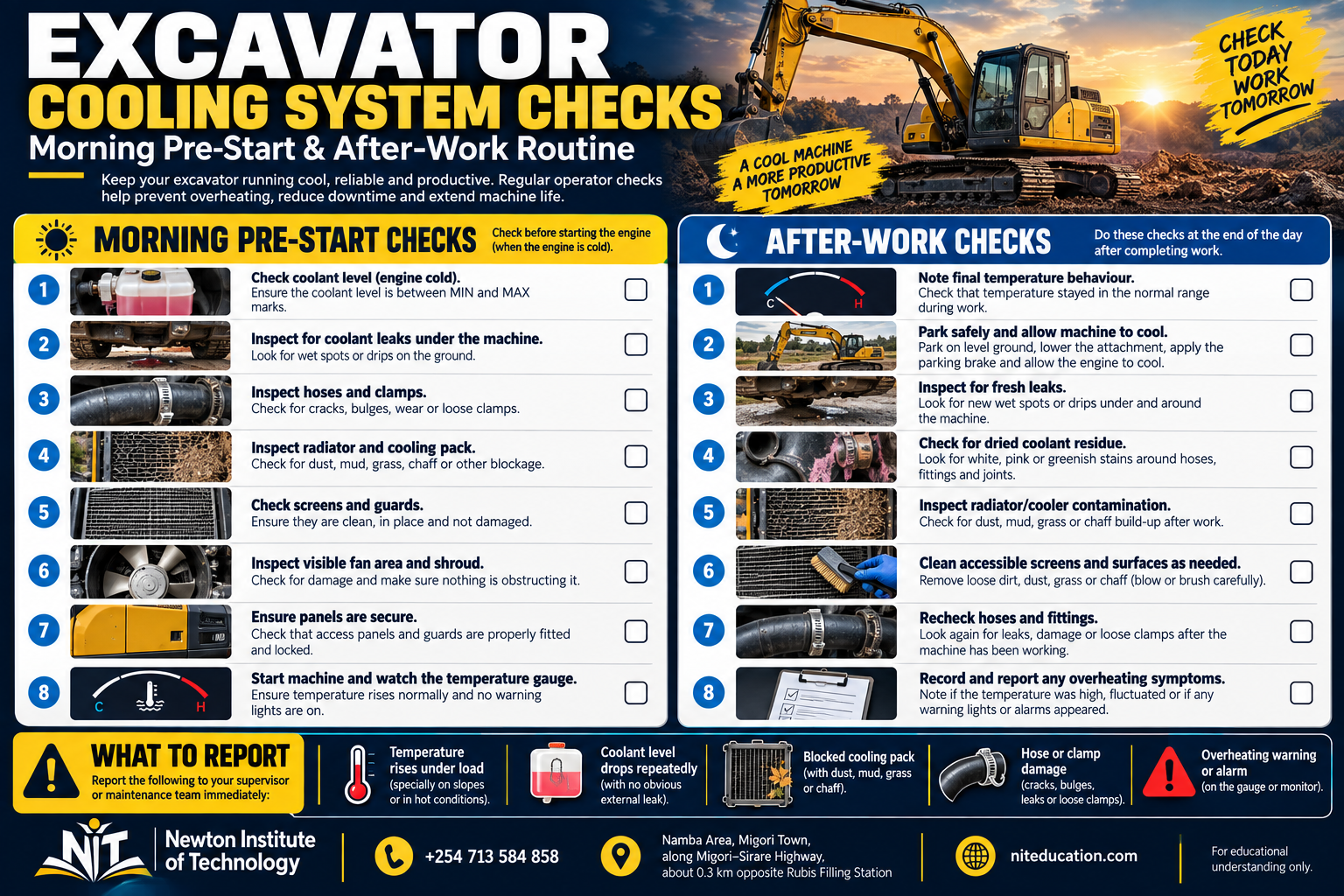
Morning pre-start checks for the excavator cooling system
The morning check establishes the cooling system’s starting condition before the excavator is put under load. Caterpillar’s excavator guidance specifically includes coolant level, hose leakage, radiator/cooler cleanliness and airflow in routine inspection. [3] [7] The sequence below keeps those cooling-specific checks together. For the complete machine walk-around, use NIT’s Plant Operator Pre-Start Inspection Checklist. [12]
| Morning check | What the operator checks | Why it matters |
|---|---|---|
| 1. Previous-shift information | Review any temperature warning, coolant top-up, leak or cooling problem reported from the previous shift. | It tells you what deserves extra attention before the machine works again. |
| 2. Ground under the machine | Look for fresh coolant, wet patches or dried coloured residue below the engine and cooling area. | A small overnight leak may be easiest to see before the machine moves. |
| 3. Coolant level | With the machine in the specified checking condition, confirm the coolant level against the correct cold-level markings. | Low coolant reduces the amount of heat the circuit can carry away. |
| 4. Expansion / recovery tank | Check the tank body, level marks, cap area and connected hoses for damage or leakage. | The tank manages coolant expansion and recovery as temperature changes. |
| 5. Visible coolant residue | Look around hose joints, radiator tanks, water-pump area and accessible connections for wetness or dried deposits. | Residue often shows where coolant has escaped even when the leak is not active at that moment. |
| 6. Radiator face | Check for dust, grass, mud, insects, plastic, paper, bent fins or impact damage. | The radiator cannot reject heat effectively when airflow through its fins is restricted. |
| 7. Hydraulic-oil cooler and other cores | Identify the visible cooler sections and check them for blockage and damage. | Several heat exchangers may depend on the same fan airflow. |
| 8. Air intake screens and grilles | Clear accumulated grass, leaves, plastic and other debris from cooling-air entry points. | A blocked screen can restrict airflow before it even reaches the radiator. |
| 9. Between-core spaces | Where the machine provides safe inspection access, look for trapped material between stacked or hinged cooler sections. | The front surface can look clean while debris remains hidden deeper in the cooling pack. |
| 10. Coolant hoses | Inspect accessible hoses for cracks, rubbing, swelling, collapse, wetness and abnormal ageing. | Hose damage can cause coolant loss or restrict circulation. |
| 11. Hose clamps and connections | Look for loose, displaced or leaking connections without dismantling the system. | Connections are common places for small coolant leaks to appear. |
| 12. Fan and shroud | With the engine stopped and secured, look for damaged blades, obstruction and visible shroud damage. | The fan and shroud are central to moving air through the cooling pack. |
| 13. Fan / water-pump drive where visible | On belt-driven arrangements, look for obvious cracking, glazing or abnormal looseness according to the machine’s service guidance. | A drive problem can reduce fan speed or coolant circulation. |
| 14. Engine compartment cleanliness | Remove loose combustible or airflow-blocking debris around the cooling and engine compartments. | Clean compartments make leaks easier to spot and keep the cooling-air path open. [13] |
| 15. Start-up monitor check | After starting, confirm that the coolant-temperature display and warning lamps behave normally and watch the early warm-up trend. | This establishes the day’s baseline before heavy digging or loading begins. |
Ground → level → tank → leaks → screens → cooler cores → hoses → fan → monitor. Start the shift knowing both the coolant side and the airflow side are ready for work.
Read the pattern
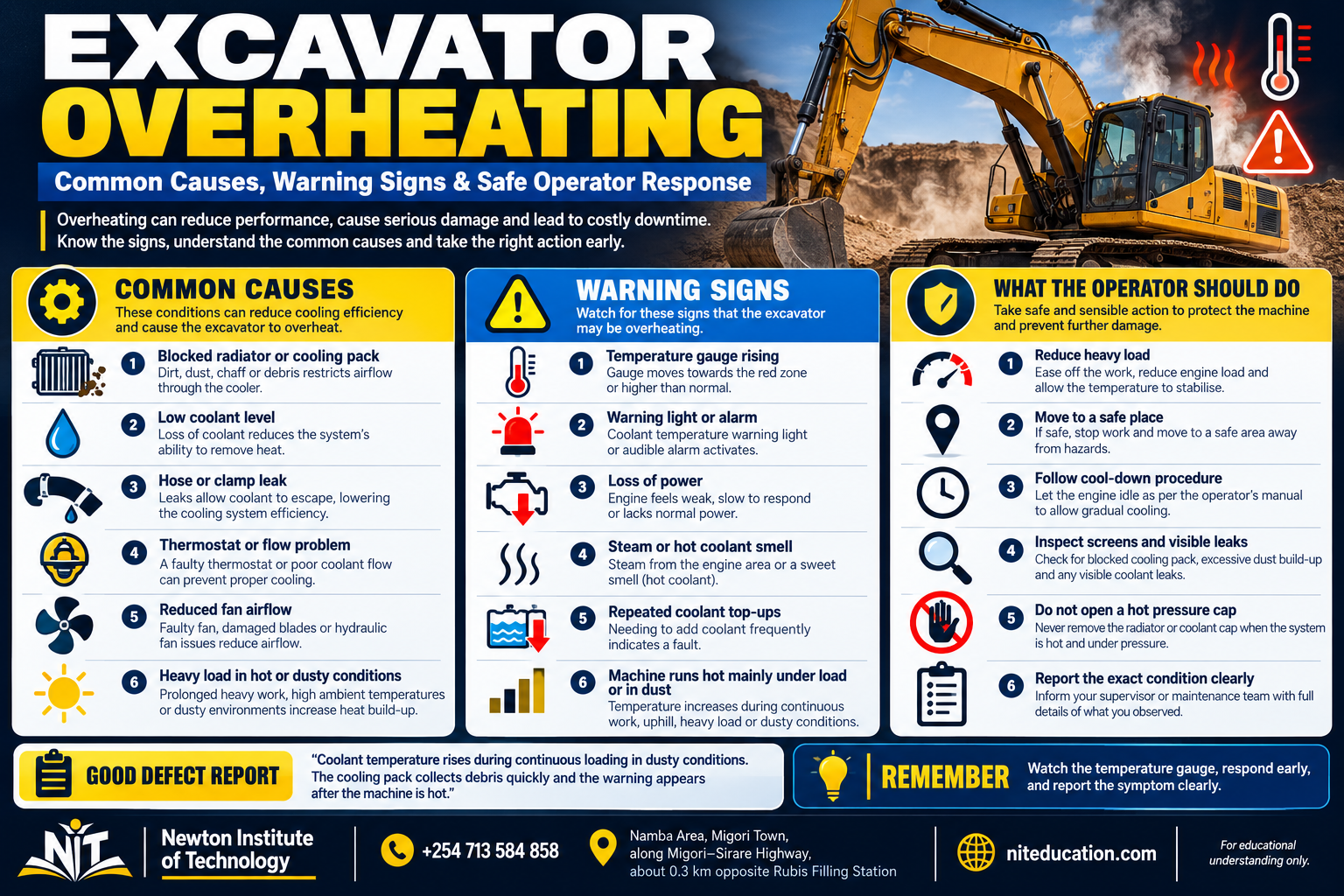
Why does an excavator overheat? Common causes and operator clues
An overheating warning becomes much more useful when the operator records when it happens and what changes with it. Caterpillar lists overheating, coolant leakage, coolant odour and steam or vapour among common radiator or thermostat repair indicators. [1] [2] The pattern helps separate an airflow problem, coolant-loss problem or circulation problem before workshop testing begins.
| What you observe | Possible area to inspect | Useful report |
|---|---|---|
| Temperature rises gradually under heavy load | Airflow restriction, cooling-pack contamination, fan performance, coolant level. | State the work being done, ambient condition and how long it takes for temperature to climb. |
| Temperature rises quickly after start | Coolant circulation problem, thermostat issue, very low coolant or another cooling fault. | Record how soon the warning appears and whether the radiator hoses or coolant level show anything abnormal. |
| Coolant level repeatedly drops | External leak, cap/overflow issue or internal loss requiring technical diagnosis. | Record where wetness or residue appears and how much coolant is being lost. |
| Steam or coolant vapour | Overheating or pressurised coolant escape. | Park safely and treat the cooling system as hot and pressurised. |
| Sweet coolant smell | Coolant leakage or vapour. | Note where the smell is strongest and whether visible leakage is present. |
| Engine hot and hydraulic oil hot together | Shared airflow restriction or fan/cooling-pack problem can affect multiple coolers. | Report both temperature indications, not only the engine gauge. |
| Temperature normal at light work, high at sustained work | Cooling capacity or airflow may be marginal under load. | Record the specific duty cycle that triggers the rise. |
| Temperature warning with clean visible radiator face | Hidden between-core debris, coolant-flow problem, fan/drive problem or sensor/monitor issue. | Do not assume “radiator looks clean” ends the inspection. |
When the gauge changes
What should an excavator operator do when temperature starts rising?
Treat a rising coolant-temperature warning as an immediate change in operating condition. Current excavators use temperature gauges, warning lights and alarms to bring that change to the operator’s attention; John Deere’s 210 P-Tier, for example, includes an engine-coolant-temperature indicator with an audible alarm. [8]
Act on the first warning
Watch the coolant-temperature gauge and warning message. Stop the work cycle as soon as the machine shows an abnormal temperature trend.
Stop loading the engine
End the digging, loading or travel demand and move directly into the machine’s indicated cool-down or shutdown procedure.
Park safely
Choose stable ground, lower the attachment as required and secure the machine according to the operating procedure.
Follow the machine instruction
Use the monitor message and the machine’s operating procedure to decide whether the engine should idle for cooling or be shut down.
Let the hot system cool
Do not remove a pressure cap while the cooling system is hot. Caterpillar’s hot-fluid warning specifically prohibits removing the pressure cap when hot. [5]
Inspect after cooling
Check coolant level, visible leakage, hoses, radiator/cooler blockage, screens and other operator-accessible items.
Report what changed
Record the load, time, warning, coolant condition and visible evidence before the machine returns to service.
Dusty-site maintenance
How to clean an excavator radiator and cooling pack correctly
Dusty work makes cooling-pack cleaning part of normal excavator care. Kobelco recommends regular radiator cleaning in dusty environments and compressed air applied from a distance; Caterpillar likewise specifies low-pressure water or air for the oil cooler, condenser and radiator. [9] [3]
Secure and cool the machine
Park, shut down and cool the machine before opening the cooling compartment. Keep hands, tools and clothing clear of the fan area until the machine is secured.
Expose all cooling surfaces
Where the design allows it, open or swing away screens, condensers or hinged cooler sections so trapped debris between cores can be removed. Komatsu specifically designs some excavators for improved radiator-cleaning access. [6]
Protect the fins
Use the method and pressure specified by the manufacturer. Bent fins can reduce airflow just as contamination does.
Confirm the airflow path
Check that debris has been removed rather than pushed deeper between stacked heat exchangers.
The fluid inside the circuit
Why the correct coolant matters
Coolant does more than carry heat. Caterpillar notes that a correctly formulated coolant also protects against boiling, freezing, corrosion, scale and deposits. [10] Use the coolant specification, concentration and service interval stated for the machine; colour by itself is not a coolant specification.
Common training mistakes
Five cooling-system mistakes that cause confusion
Calling every cooling part “the radiator”
The radiator is one heat exchanger. Cooling also depends on coolant, pump circulation, thermostat control, fan airflow, hoses, the pressure cap and temperature monitoring.
Checking coolant level and stopping there
A full recovery tank cannot overcome blocked airflow, poor circulation or a fan problem. Coolant flow and airflow both have to work.
Treating every finned core as the same component
The cooling pack can include a radiator, hydraulic-oil cooler, charge-air cooler and A/C condenser, each serving a different circuit.
Removing the thermostat as an overheating fix
Caterpillar explains that removing the thermostat can leave the bypass path open and worsen overheating instead of curing it. [1]
Opening the pressure cap while the system is hot
Keep the pressure cap closed until the cooling system has cooled to the machine’s specified checking condition. Caterpillar marks hot-fluid pressure as a cooling-system hazard. [5]
Useful defect information
How to report a cooling-system problem clearly
A strong cooling-system report is factual and specific. Record what warning appeared → when it appeared → what work the machine was doing → whether engine and hydraulic temperatures both changed → coolant level → visible leakage → cooling-pack condition.
| Weak report | Useful report |
|---|---|
| “Machine is overheating.” | “Coolant temperature climbs after about 25 minutes of continuous loading; it stays normal while idling.” |
| “Radiator bad.” | “Front cooling screen is packed with dry grass and the radiator face has heavy dust between the fins.” |
| “Coolant disappearing.” | “Expansion tank drops from the cold mark during each shift; dried coolant residue is visible at the upper hose joint.” |
| “Fan weak.” | “Temperature rises with both engine and hydraulic oil warnings during heavy digging; cooling pack is clean from the visible side.” |
| “It gets hot sometimes.” | “Temperature is normal in the morning but rises during sustained work in the afternoon; no visible coolant leak.” |
End of the shift
What a plant operator should check after work on the cooling system
Use the end of the shift to compare the machine with the morning baseline. New coolant residue, a lower recovery-tank level, fresh debris in the cooling pack or a temperature trend that appeared only under load all tell the next operator or maintenance team something useful. Caterpillar’s daily walk-around guidance includes coolant level, radiator-core condition, debris and visible leakage among routine checks. [13]
| After-work check | What to do or record |
|---|---|
| 1. Note the final temperature behaviour | Before shutdown, remember whether coolant temperature stayed normal, rose gradually or triggered any warning during the shift. |
| 2. Record the duty that produced heat | Note whether the change happened during continuous digging, loading, travelling, idling or another specific work cycle. |
| 3. Park and secure the machine | Use the normal end-of-shift parking and shutdown procedure on suitable ground with the attachment placed safely. |
| 4. Look underneath after parking | Check for fresh coolant or wet patches that were not present during the morning inspection. |
| 5. Let the cooling system cool before close checks | Inspect the coolant side under the machine’s specified cooled condition. A hot pressurised cooling system is not opened for routine operator inspection. [5] |
| 6. Recheck the expansion / recovery tank | Once the machine is in the correct checking condition, compare the coolant level and tank condition with the morning baseline. |
| 7. Look for new coolant residue | Inspect accessible hose joints, radiator areas and connections for fresh wetness, streaks or dried deposits that appeared during the shift. |
| 8. Recheck hoses and connections | Look for rubbing, swelling, looseness, seepage or damage that became visible after a full working day. |
| 9. Check the front screen and grille | Remove grass, leaves, paper, plastic and other material collected during the day’s work. |
| 10. Inspect the radiator and cooler pack | Check how much dust, mud or debris accumulated on the cooling surfaces and whether cleaning is required before the next shift. [3] [9] |
| 11. Check between cooler cores where accessible | Look for material drawn into spaces between the radiator, oil cooler, condenser or other heat exchangers. |
| 12. Inspect fan and shroud after shutdown | With the machine stopped and secured, look for new visible damage, obstruction or material around the fan area. |
| 13. Clear engine-compartment debris | Remove loose dirt, grass and other material that could obstruct airflow or hide tomorrow’s leak inspection. |
| 14. Write the defect report before leaving | Record the exact warning, temperature trend, work being done, coolant level, leak location and cooler condition so the next operator or maintenance team receives useful information. |
Temperature → park → look underneath → cool → level → leaks → hoses → screens → cooler pack → fan → clean → record.
Newton Institute of Technology
How we teach the excavator cooling system practically
At NIT, trainees meet the cooling system at the machine, not only on a diagram. Using the CAT 320D and other training equipment available for excavator practice, the instructor opens the service area, identifies the radiator and cooler pack, expansion tank, hoses and fan-airflow route, then connects those parts to the temperature monitor and the pre-start routine. NIT’s excavator training page documents practical work on CAT 320D and JCB equipment. [15]
monitor → recognise → reportMachine-side lesson
12-step NIT cooling-system practical lesson
Locate the cooling compartment
Open the service area using the approved procedure and identify the cooling pack.
Identify the radiator
Separate the engine radiator from other finned heat exchangers.
Identify the hydraulic cooler
Understand that it shares airflow but carries hydraulic oil, not engine coolant.
Find the expansion tank
Locate the coolant-level markings and connected hoses.
Trace major coolant hoses
Follow visible hoses between engine, radiator and coolant reservoir without dismantling components.
Locate the fan and shroud
Understand how air is pulled or pushed through the cooler stack on the training machine.
Find the airflow screens
Identify where grass, dust and larger debris first collect.
Inspect fins correctly
Look for blockage, bent fins and trapped dirt between cooler sections.
Read the monitor
Locate the coolant-temperature gauge, warning icon and machine messages.
Observe warm-up
Watch how temperature changes from cold start toward the machine’s normal operating range.
Practise an overheat response
Walk through the machine-specific safe response without opening a hot cooling system.
Write a defect report
Describe temperature behaviour, workload, coolant level, leakage and cooling-pack condition precisely.
One routine to remember
Level · airflow · warning · report
A cooling system stays understandable when the operator follows the same questions every shift.
- Before work: Is the coolant level correct and is the cooling pack clear?
- After start: Does the temperature indication warm up normally without an unexplained warning?
- During work: Is temperature staying within the machine’s familiar normal behaviour?
- If temperature rises: Stop the work cycle, follow the machine warning and cooling/shutdown procedure, and do not open a hot pressure cap.
- After work: Compare temperature behaviour with the morning baseline, inspect for fresh leakage and debris, clean the cooling-air path as required, and record any change.
- After cooling: Recheck the coolant level and accessible cooling components under the machine’s specified checking condition.
Common questions
Excavator cooling-system FAQs
What are the main parts of an excavator cooling system?
The engine-cooling circuit commonly includes coolant, water pump, thermostat, radiator, fan, hoses, pressure cap, expansion or recovery tank and temperature monitoring. The wider cooling pack may also include a hydraulic-oil cooler, charge-air cooler and A/C condenser.
What is the difference between the radiator and hydraulic-oil cooler?
The radiator cools engine coolant. The hydraulic-oil cooler removes heat from hydraulic oil. They may sit beside or in front of each other and share fan airflow, but they are separate fluid circuits.
What does the thermostat do in an excavator?
It regulates coolant routing according to temperature. Caterpillar explains that it restricts radiator flow while the engine is cold and progressively permits radiator flow as coolant warms. [1]
Can a dirty radiator make an excavator overheat?
Should I open the radiator cap if the engine is overheating?
Keep the pressure cap closed while the cooling system is hot. Park the machine, let the system cool, then use the specified checking procedure. Caterpillar identifies hot fluid under pressure as a cooling-system hazard. [5]
Why can engine and hydraulic temperatures rise at the same time?
On many excavators the radiator and hydraulic-oil cooler share the same cooling airflow. A blocked screen, dirty cooler stack or fan problem can therefore reduce heat rejection from more than one system at the same time.
Can an excavator run without a thermostat?
Caterpillar advises against operating without the water thermostat because removing it can open the bypass path and worsen overheating. [1]
How often should an excavator radiator be cleaned?
Inspect the cooling pack every shift and clean it at the interval specified for the machine, increasing attention in dusty, grassy or debris-heavy work. Kobelco specifically calls for regular radiator cleaning in dusty environments. [9]
Why does an excavator overheat mainly under load?
A temperature rise that appears during sustained digging or loading often points the operator toward cooling capacity: restricted airflow, a contaminated cooler pack, low coolant, fan performance or another circulation problem may only become obvious when heat production rises. Record the duty cycle and how long the temperature takes to climb.
Key cooling lesson
Think in two flows: coolant flow and airflow
Coolant flow carries heat from the engine to the radiator. Airflow carries that heat away from the radiator and the rest of the cooling pack.
If either flow is restricted, temperature can rise. That two-flow view gives an operator a simple field method: check coolant level and leakage on the fluid side, then screens, cooler cleanliness and fan airflow on the air side, and report what changed under load.
Learn to read the machine before heat becomes downtime
Register for Plant Operator Training at Newton Institute of Technology
Build practical excavator knowledge beyond the controls. Learn to identify the radiator and cooling pack, carry out cooling-system checks, read temperature warnings, recognise overheating patterns and connect daily inspection with safe machine operation.
Call / WhatsApp+254 713 584 858
LocationNamba Area, Migori Town · along Migori–Sirare Highway
LandmarkAbout 0.3 km opposite Rubis Filling Station
Websiteniteducation.com
Technical references
- Caterpillar. Cat Thermostat Replacement. Explains thermostat function, coolant routing during warm-up and why an engine should not be operated without thermostats. Accessed 27 September 2026. cat.com.
- Caterpillar. Cat Radiator Replacement. Radiator role, overheating and coolant-leak indicators, daily inspection, fin cleaning and coolant-maintenance guidance. Accessed 27 September 2026. cat.com.
- Caterpillar. Your Six-Step Excavator Maintenance Checklist. Cooling-system guidance on airflow, coolant level, hose leakage and low-pressure cleaning of radiator, oil cooler and condenser. Accessed 27 September 2026. cat.com.
- Caterpillar. Coolant Expansion Tank. Describes coolant expansion/recovery behaviour and level management in a radiator-engine system. Accessed 27 September 2026. parts.cat.com.
- Caterpillar. Hot Fluid Under Pressure Warning Film. Safety instruction not to remove the cooling-system pressure cap when hot. Accessed 27 September 2026. parts.cat.com.
- Komatsu. PC78US-11 Hydraulic Excavator Brochure — Maintenance Features. Documents side-by-side cooling cores and swing-open condenser access for radiator cleaning. Accessed 27 September 2026. komatsu.com PDF.
- Caterpillar. Guide to Checking Filters & Fluids on Cat Equipment. Daily walkaround guidance covering coolant level, cooler-fin blockages, hoses, connections and fittings. Accessed 27 September 2026. cat.com.
- John Deere. 210 P-Tier Excavator Specifications. Current excavator operator-monitor specification including engine coolant temperature indication with audible alarm. Accessed 27 September 2026. deere.com PDF.
- Kobelco Construction Machinery Middle East & Africa. Excavator Safety & Technical Information Vol. 2 — Radiator Cleaning. Radiator heat-exchange explanation and cleaning guidance for dusty work environments. Accessed 27 September 2026. kobelco-mea.com PDF.
- Caterpillar. Cat Coolants. Coolant functions including boiling/freezing protection and protection against corrosion, scale and deposits. Accessed 27 September 2026. cat.com.
- Newton Institute of Technology. Excavator Parts and Functions: Operator Guide Kenya. Existing whole-machine context for cooling-pack recognition and operator observation. Accessed 27 September 2026. niteducation.com.
- Newton Institute of Technology. Plant Operator Pre-Start Inspection Checklist Kenya. Whole-machine inspection framework and hot pressurised cooling-system caution. Accessed 27 September 2026. niteducation.com.
- Caterpillar. Operator Tips: Daily Machine Walk Around and Safety Checks. Operator walk-around guidance covering coolant reservoir level, radiator-core inspection, cooler-pack debris, hoses, residue and daily machine checks. Accessed 27 September 2026. cat.com.
- Caterpillar. Cat Water Pump Replacement. Explains the water pump’s role in circulating coolant and maintaining engine temperature, with overheating and coolant leakage listed among common repair indicators. Accessed 27 September 2026. cat.com.
- Newton Institute of Technology. Excavator Operator Training in Kenya. Institutional training page documenting practical excavator training on CAT 320D and JCB equipment and the pre-operation inspection topics taught to learners. Accessed 27 September 2026. niteducation.com/resources/excavator-operator-training-in-kenya/.
Prepared by: Newton Institute of Technology Editorial Team · Institutional / technical review: Engineer Simon Barongo · Updated: 28 September 2026.