

NIT Cybersecurity Readiness Guide Africa · 2026
Online Cybersecurity
Training in Africa
Labs · Linux · laptop · internet
A practical pre-course guide to checking your computer, Linux environment, virtual-lab setup and internet connection before online cybersecurity training.
Practical readiness
What do you need to study cybersecurity online?
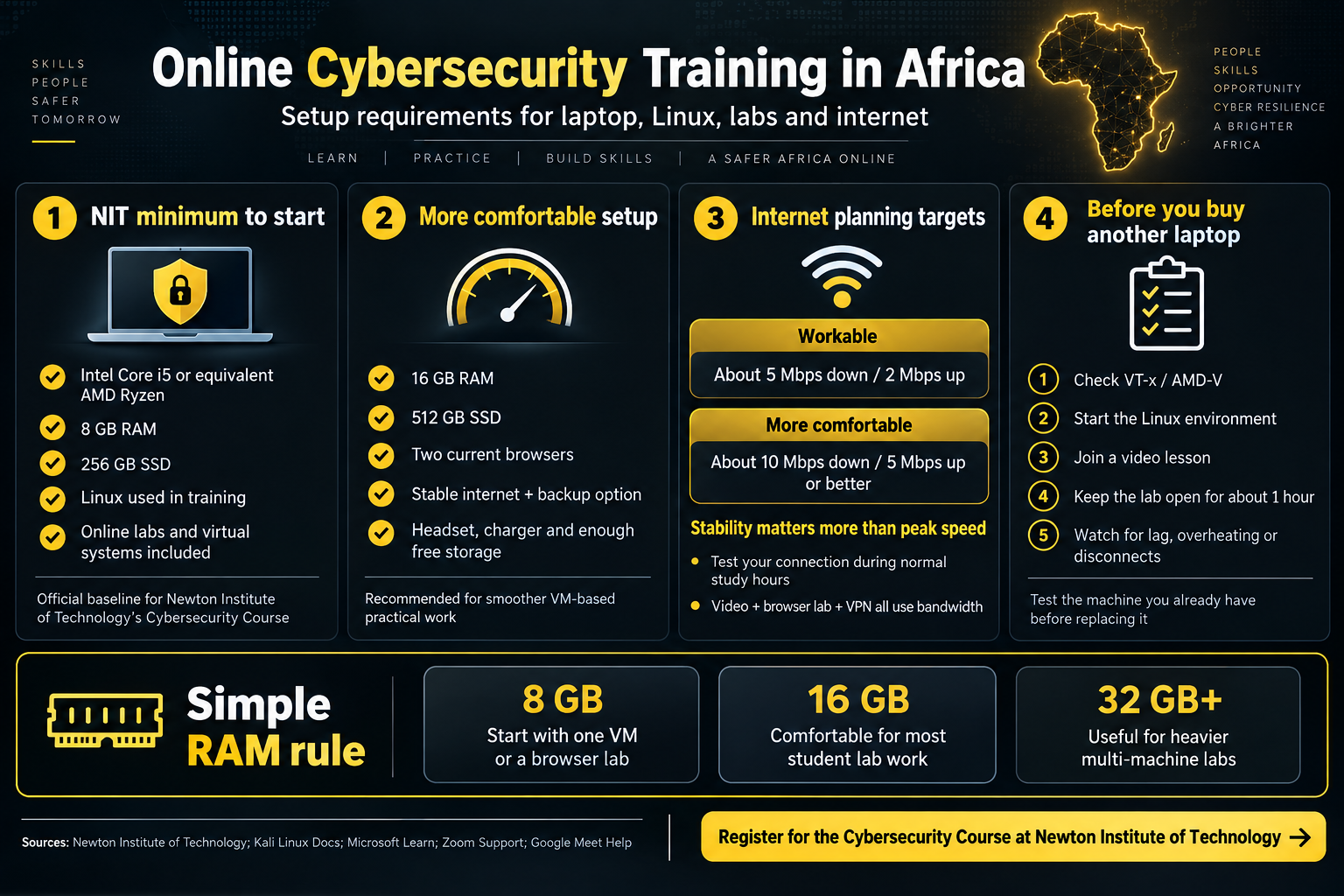
Start with a computer that can run the required Linux and lab environment, a stable connection and an authorised place to practise. For Newton Institute of Technology’s Cybersecurity Course, the confirmed minimum laptop specification is an Intel Core i5 or equivalent AMD Ryzen processor, 8 GB RAM and a 256 GB SSD. Linux and online laboratory work are part of the training. [1]
If you expect to run virtual machines locally, 16 GB RAM and a 512 GB SSD provide more working room where budget allows. That is a practical recommendation, not an NIT admission minimum.
Start with the machine you already own
Before you buy another laptop, test the current one
Do not replace a laptop simply because it is a few years old. If it already has a Core i5 or equivalent Ryzen processor, at least 8 GB RAM and an SSD, first confirm hardware virtualisation, start the Linux environment, join a video meeting and keep the lab open for roughly the length of a normal lesson.
A machine that stays responsive while Linux, the browser and a live lesson are running gives you more useful evidence than the model name alone. NIT also advises learners to check compatibility with the required Linux environment and virtual laboratories. [1]
| Check | Practical pass condition | Why it matters |
|---|---|---|
| Processor | Core i5/equivalent Ryzen or better | Baseline for the NIT practical environment. [1] |
| RAM | 8 GB or more | Host OS, browser and VM all compete for memory. |
| Storage | 256 GB SSD or more | Virtual disks, snapshots and tools consume space quickly. |
| Virtualisation | VT-x/AMD-V available where local VMs are used | Needed by many local VM configurations. [3] |
| Linux | Required environment boots and networks correctly | Installation alone is not enough; test the actual workflow. |
| Connectivity | Stable through a full lesson | Cloud labs, VPNs and video need consistent connectivity. |
Memory decision
8 GB, 16 GB or 32 GB: match RAM to the lab
8 GB RAM
A workable entry point. Prefer one carefully configured VM at a time or a browser-based lab where suitable.
NIT minimum16 GB RAM
A more comfortable target when the host OS, Kali, browser, live class and supporting tools may be open together.
Recommended where budget allows32 GB+
Useful when a lab genuinely needs several machines at once. It is not a beginner requirement.
Heavier multi-VM useKali’s VirtualBox guidance uses 2 GB as an example starting allocation and notes that extra memory allows more applications to remain open and improves performance. [3]
Storage planning
Why SSD space disappears faster than beginners expect
Cybersecurity training can leave you with several virtual disks, snapshots, Linux images, packet captures, software installers, scripts, screenshots and reports. Kali distributes official pre-built VMware and VirtualBox images in addition to installation images. [2]
Storage rule
256 GB can work; 512 GB is easier to manage
Keep enough free space for the host operating system as well as the lab. Do not let an SSD remain almost full.
- Delete obsolete VM snapshots you no longer need.
- Keep approved installation files so you do not redownload them unnecessarily.
- Check free space before extracting a large VM image.
- Prefer an SSD over an older mechanical disk for VM-heavy work.
Linux readiness
You need Linux access; you do not need to wipe Windows
Linux appears throughout cybersecurity because it is common in servers, cloud infrastructure, networking, development and security labs. NIT’s current course includes Linux administration and uses Kali Linux and Parrot Security OS where appropriate. [1]
Kali in a virtual machine
Flexible for beginners who want Linux separated from the main OS. Kali provides official pre-built VMware and VirtualBox images. [2]
Windows Subsystem for Linux
Useful for Bash, Python, Git, scripting and general command-line work on compatible Windows systems. [4]
Browser-based Linux lab
Useful when the laptop is modest but the connection is stable because the remote machine carries much of the workload.
WSL is excellent for many command-line tasks, but it does not automatically replace a complete VM when a lab requires isolated machines or its own virtual network.
Three common architectures
Understand where the cybersecurity lab actually runs
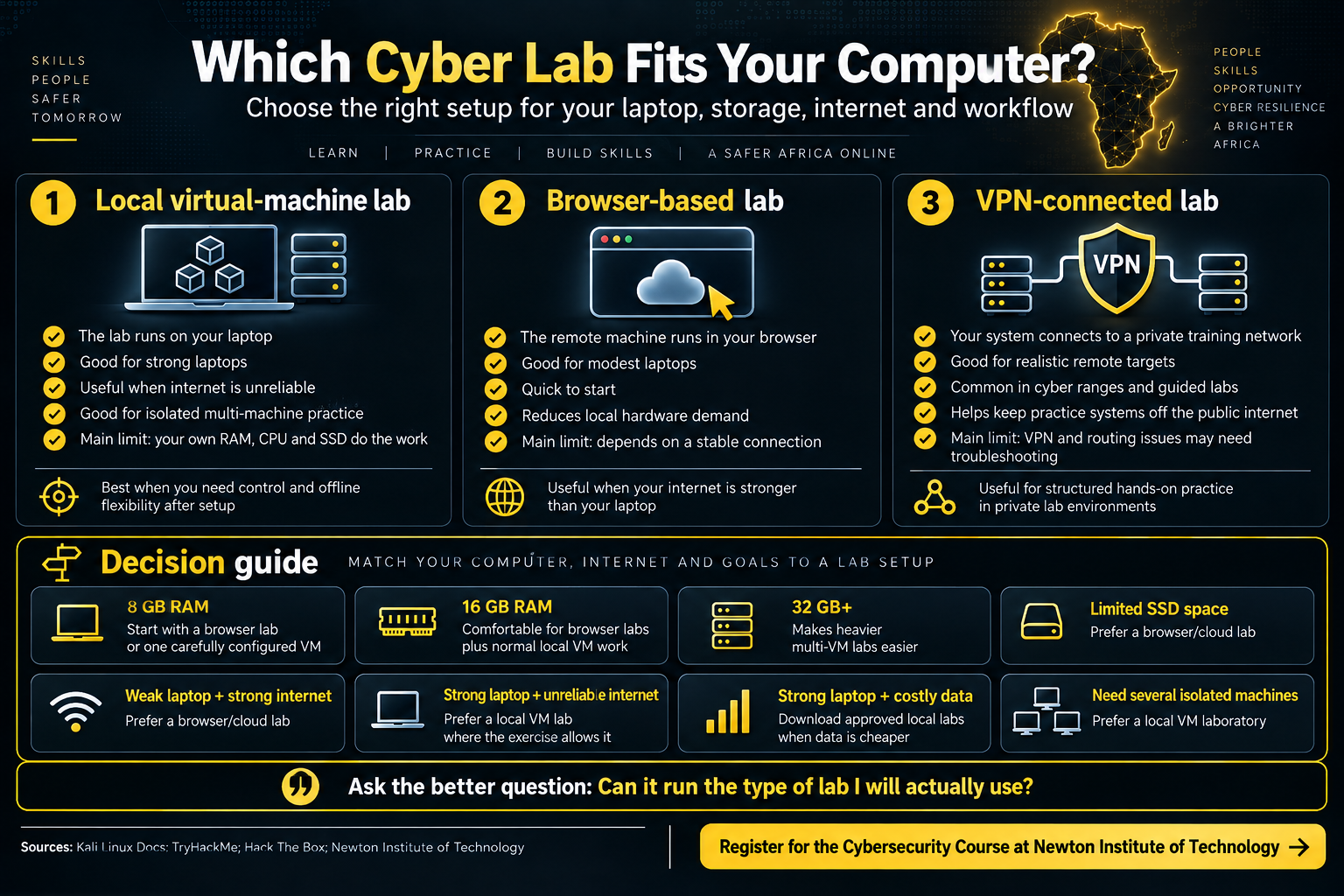
Local virtual-machine lab
The machines run on your laptop. This gives control and can reduce dependence on live internet after setup, but your own RAM, CPU and SSD carry the workload.
Browser-based lab
A remote machine runs elsewhere and you operate it through the browser. TryHackMe’s AttackBox is one example. [5]
VPN-connected private lab
Your computer or VM connects to a controlled training network. Hack The Box and TryHackMe document private lab access through VPN workflows. [5] [6]
Choose by constraint
Which lab setup fits your computer?
| Your situation | Practical starting approach | Reason |
|---|---|---|
| 8 GB RAM | Browser lab or one carefully configured VM | Avoid exhausting host memory. |
| 16 GB RAM | Browser labs plus normal local VM work | More working room for simultaneous tools. |
| 32 GB+ | Heavier multi-VM labs | Useful when several isolated machines are genuinely required. |
| Limited SSD space | Browser/cloud lab | Reduces local virtual-disk storage. |
| Weak laptop + strong internet | Browser/cloud lab | Remote infrastructure carries more of the workload. |
| Strong laptop + unreliable internet | Local VM where the exercise permits it | More of the lab stays on the local machine. |
| Strong laptop + costly data | Download approved local labs when data is cheaper | Limits repeated large transfers. |
Do not ask only, “Can this laptop run Kali?” Ask: “Can it run the type of lab I will actually use?”
Connectivity
For online cybersecurity, stability matters more than a single speed-test peak
A practical online session can combine video conferencing, screen sharing, documentation, cloud labs, VPN traffic and uploads. Zoom currently recommends roughly 2.6 Mbps down / 1.8 Mbps up for 720p group video and about 3.8 Mbps down / 3.0 Mbps up for 1080p group video. [7]
Google’s Meet troubleshooting guidance recommends observing bandwidth and latency over time and using wired Ethernet where available. [8]
Africa-ready connection planning
Fibre, fixed wireless, 4G or 5G can all work
Judge the connection from the place and time you will actually study. Fibre can make large VM downloads and cloud labs convenient. Fixed wireless can be effective when coverage is stable. 4G or 5G can also support practical training if signal strength is consistent, data costs are manageable and the connection does not keep resetting.
One-hour test
Recreate the real class workload
One speed test is not enough. Test during your normal study hours.
- Join a video meeting.
- Keep the browser and lab open.
- Connect the approved VPN if the lab uses one.
- Upload a file and download a file.
- Watch for repeated drops or large latency spikes.
Data + power planning
Plan large downloads and short power interruptions before class
Kali distributes official pre-built VMware and VirtualBox images, so initial setup can involve large downloads and extracted virtual disks. [2] If mobile data is expensive or limited, schedule large downloads when connectivity is cheaper, keep approved installation files and avoid repeated downloads.
For power, the useful question is whether your laptop, router or mobile hotspot can stay available long enough to finish a lesson. A healthy laptop battery, a charged hotspot or phone, and a small router UPS where practical can be more useful than waiting until an outage exposes the weakness.
Tools
A smartphone helps, but it is not the practical lab
A phone is useful for communication, notes, lessons and demonstrations. It does not replace the main computer when practical work involves virtual machines, Linux terminals, packet analysis, programming, VPN connections and technical reports. NIT’s current cybersecurity requirements therefore specify a compatible computer for the practical environment. [1]
The NIT course currently uses Linux environments, VirtualBox, networking and security-analysis tools, plus scripting technologies as they become relevant to the curriculum. [1]
Pre-course test
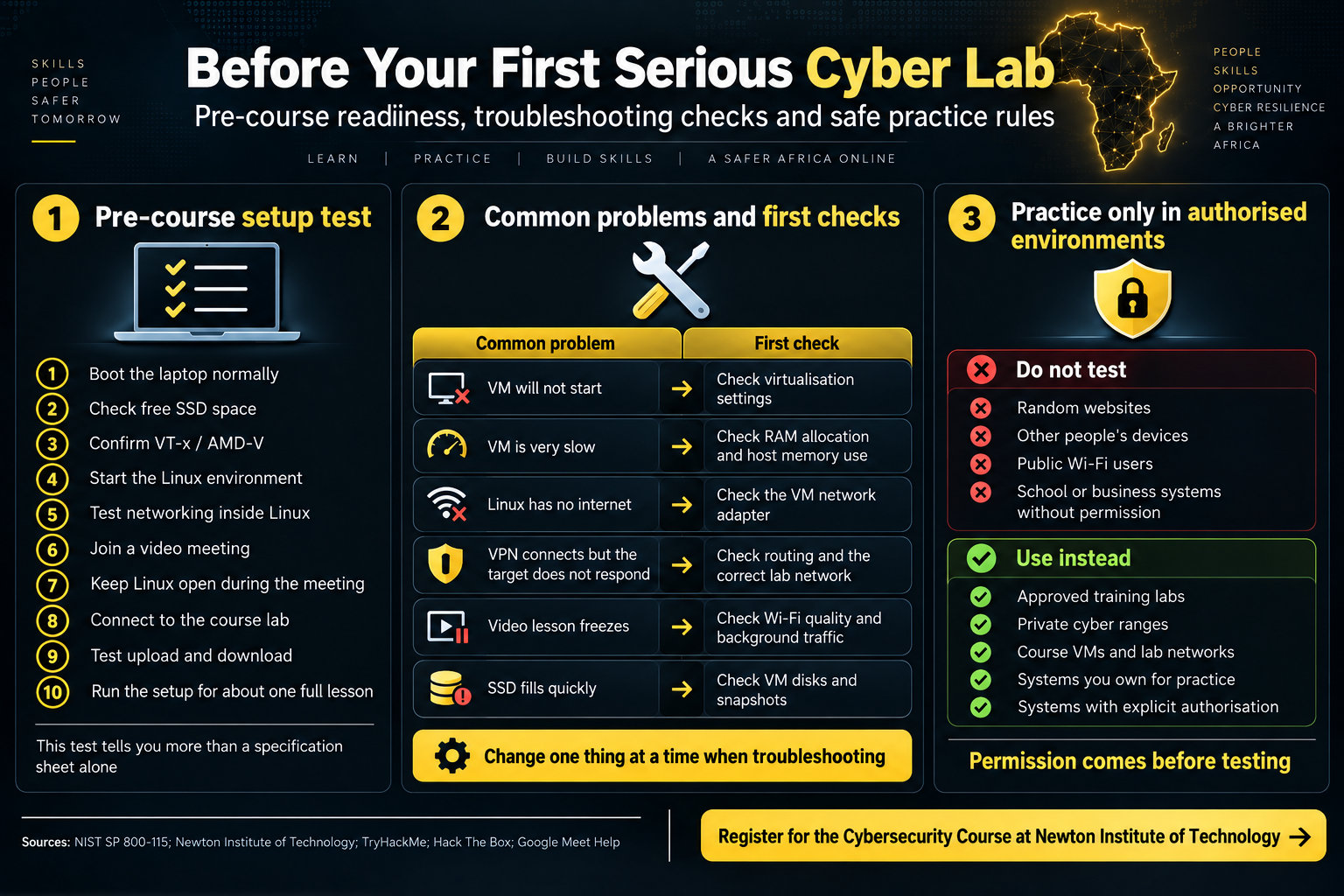
Run this sequence before your first serious cyber lab
Boot + storage
Start normally and confirm the SSD has useful free space.
Virtualisation + Linux
Confirm the required virtualisation setting, start Linux and test networking inside it.
Lesson + lab together
Join a meeting, leave Linux open and connect to the course lab at the same time.
Upload + download
Verify both directions work on the connection you will normally use.
Run a full-session test
Watch for severe lag, disconnections, overheating, crashes and battery problems.
Record the failure
When something breaks, change one thing at a time so you know what actually fixed it.
Troubleshooting
Common problems and the first thing to check
| Problem | First check | Why |
|---|---|---|
| VM will not start | VT-x/AMD-V and virtualisation settings | The hypervisor may not have the required hardware feature available. |
| VM is very slow | RAM allocation and host memory use | The guest and host may be competing for too little memory. |
| Linux has no internet | VM network-adapter settings | A misconfigured virtual adapter can isolate the guest unintentionally. |
| VPN connects but target does not respond | Correct lab network and routing | Private lab routes can differ from ordinary internet routes. |
| Video lesson freezes | Wi-Fi quality and background traffic | Bandwidth and latency can degrade when other traffic competes. |
| SSD fills quickly | VM disks and snapshots | Snapshots and virtual disks can become large. |
Authorised practice only
Cybersecurity training does not give permission to test random systems
NIST’s technical security-testing guidance treats assessment as a planned process involving defined tests, analysis of findings and mitigation. [9] Training platforms follow the same basic boundary by putting deliberately vulnerable targets inside private lab environments. [5] [6]
Use instead
Practise inside an authorised scope
Permission comes before testing.
- Instructor-approved training labs.
- Private cyber ranges and course VMs.
- Systems you own and deliberately prepared for practice.
- Systems covered by explicit authorisation.
Final check
Online cybersecurity readiness checklist
Computer + Linux
Your setup should survive the real workload
Tick these after testing, not after reading a product listing.
- Core i5/equivalent Ryzen or better.
- At least 8 GB RAM and 256 GB SSD for the NIT baseline. [1]
- Required virtualisation available where local VMs are used.
- Linux starts normally and networking works inside it.
- Video lessons and the course lab remain usable together.
- Browser, microphone and screen sharing have been tested.
- Connection remains stable through a full session.
- Testing stays inside authorised systems.
The practical rule
Choose the lab first, then judge the laptop
A browser lab, a single Kali VM and a multi-machine local range place very different demands on a computer. Test the workload you will actually use before replacing equipment or paying for an upgrade.
Newton Institute of Technology
Online cybersecurity training at NIT
Newton Institute of Technology offers its Cybersecurity Course through physical, evening and fully online study. The online option includes virtual systems and online laboratory activities, while the confirmed minimum laptop specification is an Intel Core i5 or equivalent AMD Ryzen processor, 8 GB RAM and a 256 GB SSD. [1]
For curriculum, duration, fees, admissions and course structure, use NIT’s Cybersecurity Course in Kenya. For job roles, use Cybersecurity Career in Kenya. For workplace placement guidance, use ICT Industrial Attachment in Kenya.
Quick questions
Frequently asked questions
Can I study cybersecurity online from Africa?
Yes. The technical essentials are a compatible computer, sufficiently stable connectivity and access to the authorised lab environment used by the course. Online study still requires genuine practical work.
Is 8 GB RAM enough for cybersecurity training?
It meets NIT’s current minimum laptop requirement. [1] For local VM work, manage memory carefully. If you are buying specifically for training and the budget allows it, 16 GB gives more room.
Is a 256 GB SSD enough?
Yes, as a starting point, but you will need to manage VM disks, snapshots and free space. A 512 GB SSD is more convenient if you expect to keep several virtual machines.
Do I have to install Kali Linux?
Not necessarily as your main operating system. Kali provides official pre-built VMware and VirtualBox images, so a VM is a practical option for many learners. [2]
Can I use Windows or WSL?
Yes, where the required course tools and labs support the setup. Microsoft provides WSL for compatible Windows systems. [4] Some exercises still require a complete VM.
What internet speed should I have?
There is no universal cybersecurity-training speed requirement. As a planning target, about 5 Mbps down / 2 Mbps up can be workable, while 10 Mbps down / 5 Mbps up or better gives more headroom. Stability and latency matter just as much. [8]
References
Technical and institutional sources
- Newton Institute of Technology — Cybersecurity Course in Kenya. Online delivery, laboratories, Linux use and NIT minimum laptop requirements.
- Kali Linux Documentation — Downloading Kali Linux. Official VMware and VirtualBox virtual-machine images.
- Kali Linux Documentation — Kali inside VirtualBox. VM memory and virtualisation guidance.
- Microsoft Learn — Set up a WSL development environment. WSL setup and supported Windows environment.
- TryHackMe — Networks Explained: VPN, AttackBox and Security Tips. Browser AttackBox, private networks and VPN access.
- Hack The Box — Understanding the Hack The Box VPN. VPN access to private laboratory targets.
- Zoom Support — System and bandwidth requirements. Video-meeting bandwidth guidance.
- Google Meet Help — Troubleshoot video and audio quality. Bandwidth, latency and wired-network troubleshooting guidance.
- NIST SP 800-115 — Technical Guide to Information Security Testing and Assessment. Structured technical security testing and assessment.
Prepared by: Newton Institute of Technology Editorial Team · Institutional / Technical review: Engineer Simon Barongo · Reviewed: 21 September 2026
Practical cybersecurity training
Register at Newton Institute of Technology
NIT’s six-month Cybersecurity Course is available online and includes Linux, virtual systems and practical laboratory work, followed by the institute’s compulsory three-month industrial attachment. [1]
Minimum laptopCore i5 / Ryzen · 8 GB · 256 GB SSD
Study modeFully online available
IntakeOpen / continuous